Quick overview
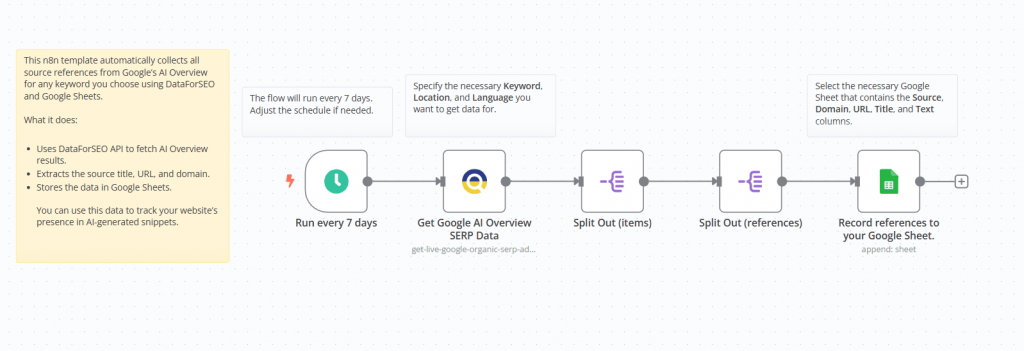
This scenario automatically gathers all cited sources from Google’s AI Overview section using the DataForSEO SERP API. It captures key details such as the source title, URL, and domain, then stores the information in Google Sheets for convenient review and analysis.
With this template, you can measure your visibility in AI-driven search results and identify authoritative domains that Google highlights for your target queries.
Who it’s built for
SEO specialists and digital marketing professionals who want to analyze which websites Google references in its AI Overview results for specific keywords. It’s also useful for tracking competitor exposure and evaluating how often your own site is featured in AI-generated summaries.
Workflow breakdown
- Runs on a defined schedule (by default, once every 7 days).
- Sends a request to the DataForSEO SERP API for your selected keyword.
- Processes the AI Overview response to identify and extract referenced sources.
- Records the structured results in a Google Sheets document.
What you get
With this automation, you receive a repeatable, hands-off process for extracting and recording the source references that Google highlights in its AI Overview results. Instead of manually checking SERP results, the workflow pulls all cited source details — such as the title, URL, and domain — and organizes them in Google Sheets where they can be easily reviewed, filtered, and analyzed. The result is a centralized, structured dataset that helps you monitor how often your site or competitors are referenced in AI-generated summaries and quickly spot high-authority domains associated with your target keywords.
What you need to get started
- DataForSEO account and API credentials (your API login and password).
- A Google Sheet prepared with the following columns: Source, Domain, URL, Title, and Text (structured similarly to the provided example sheet).
- A Google account connected to the n8n platform.