


dark bg hr 1

Empower AI integration with
DataForSEO MCP

Connect your AI application with the most capable source of SEO data

Sign up to DataForSEO

Get Started With DataForSEO MCP

Choose your AI client and follow the instructions to connect with DataForSEO APIs.

  1. 1

    Open Claude Desktop and go to Customize → Connectors.

  2. 2

    Click Add custom connector and paste the DataForSEO MCP HTTP URL:

    https://mcp.dataforseo.com/http
  3. 3

    When prompted, approve the Authorization request to access the DataForSEO API.

  4. 4

    Start a new chat. Claude will request your approval the first time it calls a DataForSEO tool.

  1. 1

    Open the configuration file:

    ~/Library/Application Support/Claude/claude_desktop_config.json
    On Windows: %APPDATA%\Claude\claude_desktop_config.json
  2. 2

    Add the following configuration to the file:

    JSON
    {
      "mcpServers": {
        "dataforseo": {
          "command": "npx",
          "args": ["-y", "dataforseo-mcp-server"],
          "env": {
            "DATAFORSEO_USERNAME": "your_api_login",
            "DATAFORSEO_PASSWORD": "your_api_password"
          }
        }
      }
    }
  3. 3

    Replace your_api_login and your_api_password with credentials from the API Access dashboard.

  4. 4

    Restart Claude Desktop. The DataForSEO tools will appear in your tool list.

  1. 1

    Generate a Base64 token from your API login and password (or copy a pre-encoded one from the API Access dashboard via the Send by Email button).

  2. 2

    Add the remote DataForSEO MCP server in your terminal:

    Bash
    claude mcp add --header "Authorization: Basic " --transport http dfs-mcp https://mcp.dataforseo.com/http
  3. 3

    Verify the connection:

    Bash
    claude mcp list
  1. 1

    Make sure you have Node.js 18+ installed.

  2. 2

    Register the local NPX server with your credentials:

    Bash
    claude mcp add dataforseo \
      --env DATAFORSEO_USERNAME=your_api_login \
      --env DATAFORSEO_PASSWORD=your_api_password \
      -- npx -y dataforseo-mcp-server
  3. 3

    Verify the connection:

    Bash
    claude mcp list
    Check our Help Center for more ways to install DataForSEO MCP with Claude Code.
  1. 1

    In Cursor, open Settings → Tools & Integrations → MCP Tools.

  2. 2

    Click Add Custom MCP and paste the remote configuration:

    JSON
    {
      "mcpServers": {
        "dataforseo": {
          "url": "https://mcp.dataforseo.com/mcp",
          "headers": {
            "Authorization": "Basic "
          }
        }
      }
    }
  3. 3

    Replace with your Base64-encoded username:password from the API Access dashboard.

  4. 4

    Save and reopen the chat. Cursor supports up to 40 active MCP tools — disable any modules you don’t need.

  1. 1

    Open the global Cursor MCP configuration:

    ~/.cursor/mcp.json
    You can also access this file from Settings → Tools & Integrations → Add Custom MCP.
  2. 2

    Add the local NPX configuration:

    JSON
    {
      "mcpServers": {
        "dataforseo": {
          "command": "npx",
          "args": ["-y", "dataforseo-mcp-server"],
          "env": {
            "DATAFORSEO_USERNAME": "your_api_login",
            "DATAFORSEO_PASSWORD": "your_api_password"
          }
        }
      }
    }
  3. 3

    Replace credentials with values from the API Access dashboard and save the file.

  4. 4

    Restart Cursor or reload the MCP servers from Tools & Integrations.

  1. 1

    Log into the OpenAI platform dashboard and start a new Chat with your preferred model.

  2. 2

    Click Tools → MCP Server → Add new.

  3. 3

    Paste the DataForSEO MCP server URL and give the connector a label:

    https://mcp.dataforseo.com/mcp
  4. 4

    Choose Custom headers as the authentication method and add:

    Header
    Authorization: Basic 
    Your credentials must be Base64-encoded. Use the Send by Email button in the API Access dashboard to receive a ready-to-use token.
  5. 5

    Enable the DataForSEO modules you want to expose and click Update.

  1. 1

    Install the Gemini CLI globally:

    Bash
    npm install -g @google/gemini-cli
  2. 2

    Open the Gemini settings file:

    ~/.gemini/settings.json
    Windows: C:\Users\\.gemini\settings.json
  3. 3

    Add the DataForSEO MCP server:

    JSON
    {
      "selectedAuthType": "gemini-api-key",
      "mcpServers": {
        "dataforseo": {
          "command": "npx",
          "args": ["-y", "dataforseo-mcp-server"],
          "env": {
            "DATAFORSEO_USERNAME": "your_api_login",
            "DATAFORSEO_PASSWORD": "your_api_password"
          }
        }
      }
    }
  4. 4

    Restart the CLI and run /mcp list to confirm DataForSEO is connected.

  1. 1

    Install Docker for your operating system.

  2. 2

    Pull and run the official DataForSEO MCP image:

    Bash
    docker run -p 3000:3000 \
      -e DATAFORSEO_USERNAME=your_api_login \
      -e DATAFORSEO_PASSWORD=your_api_password \
      dataforseo/mcp:latest
    Use your API login and password from the API Access section of the dashboard.
  3. 3

    The MCP server is now available locally at:

    http://localhost:3000
    Connect any MCP-compatible client to that URL. See the Docker Hub repository for advanced configuration.
  1. 1

    Point your MCP-compatible client to the official DataForSEO remote endpoint:

    https://mcp.dataforseo.com/mcp
  2. 2

    Authenticate with a Base64-encoded Basic Auth header:

    Header
    Authorization: Basic 
    Get your credentials from the API Access dashboard. The Send by Email button delivers a pre-encoded token.
  3. 3

    If your client expects a separate SSE endpoint, use https://mcp.dataforseo.com/http.

  1. 1

    Make sure Node.js 18+ is installed, then launch the server locally:

    Bash
    npx -y dataforseo-mcp-server
  2. 2

    Provide your credentials as environment variables:

    Bash
    export DATAFORSEO_USERNAME=your_api_login
    export DATAFORSEO_PASSWORD=your_api_password
  3. 3

    Or register the server directly inside your client config:

    JSON
    {
      "mcpServers": {
        "dataforseo": {
          "command": "npx",
          "args": ["-y", "dataforseo-mcp-server"],
          "env": {
            "DATAFORSEO_USERNAME": "your_api_login",
            "DATAFORSEO_PASSWORD": "your_api_password"
          }
        }
      }
    }
    Need a different setup? See the full DataForSEO MCP help center.

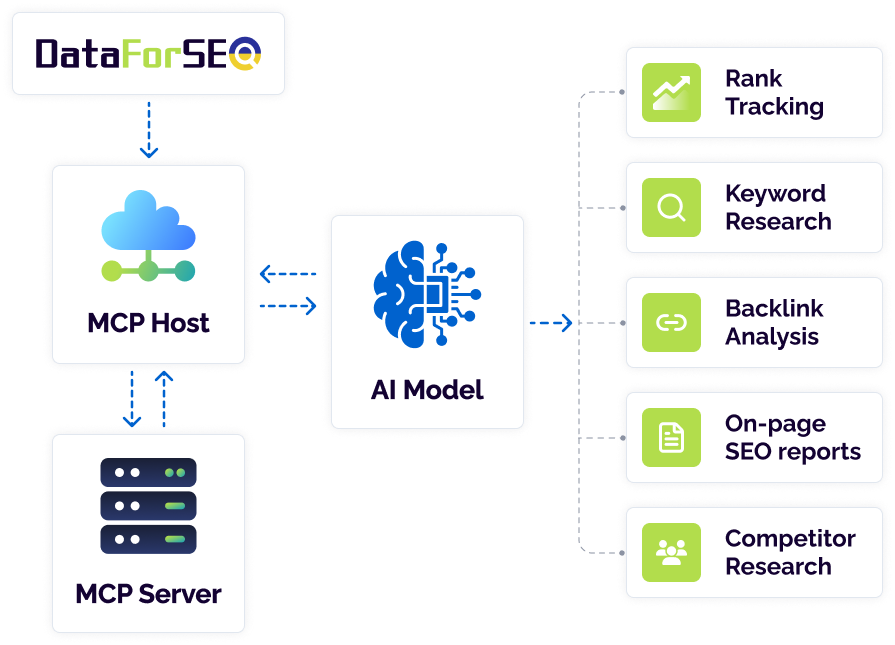
How does it work?

MCP Clients

AI applications that communicate with MCP servers.

Manual for Claude AI >>

MCP Server

A bridge between your AI model and DataForSEO APIs, managing requests and responses.

DataForSEO MCP Server >>

MCP Host

The application managing MCP clients and controlling permissions and security polices.

mcp img

Fast-track your AI training: gather data at scale without interruption

Accelerated integration

Accelerated integration

Take advantage of out-of-the-box MCP to swiftly connect your AI model to a range of DataForSEO APIs without undertaking lengthy technical integration.

Interoperability

Interoperability

MCP server allows connecting DataForSEO APIs to a variety of AI models, like Claude, and Integrated Development Environments like Cursor AI.

Scalability

Scalability

From pay-as-you-go pricing model to API endpoints – all DataForSEO services are built for outmost scalability. DataForSEO MCP server is no exception.

DataForSEO MCP server is made for every application

The DataForSEO MCP server is designed to support AI-driven applications across different industries and use cases. It enables seamless access to structured SEO and marketing data, making it a reliable foundation for training language models, powering search intelligence tools, and enriching large-scale datasets.

You can install DataForSEO MCP locally or easily connect through the Docker container.

AI-powered SEO tools

The DataForSEO MCP server delivers structured, real-time SEO data optimized for use in AI-powered tools, enabling accurate insights and intelligent automation at scale.

In-house SEO & marketing analysis

You get reliable, high-volume access to SEO and marketing data without any coding, making it easy to power up in-house analysis and reporting.

Jumpstart your journey with DataForSEO Labs API

DataForSEO API Documentation

Documentation is the starting point on your journey towards building a powerful SEO software.

LEARN MORE
pricing docs hc

DataForSEO Help Center

Have questions about DataForSEO APIs and integrations? Visit our Help Centre to find the right answers.

LEARN MORE
SERP API Help Center img

Start your unlimited free trial

Release in days, not weeks

Integrating a new data source can take a lot of time and money. We accelerate this process by providing a user-friendly interface for controlling your API usage and spending.

Well-rounded documentation

release 1

DataForSEO offers a detailed documentation for every parameter, field and function you can come across while using our APIs and databases.

VIEW

GUI for API usage control

release 2

Every DataForSEO user has access to a comprehensive graphic user interface (GUI) and can monitor and control every aspect of data usage.

REGISTER

Ad hoc integration and deployment support

release 3

Our support team is available 24/7 to ensure you get the required assistance and all your requests are addressed promptly and proficiently.

CONTACT US

Data industry leaders trust

Solutions developers praise

twinword head
Customer success story

Twinword Wins 35% More Paid Customers After Switching To DataForSEO APIs

Learn more
rev Kono Kim

"I always recommend DataForSEO. No worries about server capacity, no need for maintenance, and splendid possibilities for rapid development when we want to try something new. Why reinvent the wheel?"

logo-linkedin
Kono Kim Connect on LinkedIn
pathfinder seo home
Customer success story

How DataForSEO Helps Pathfinder SEO Guide its Customers, One Simple Task at a Time

Learn more
rev Lindsay Halsey

"We found DataForSEO online while we were planning for the beta version of our software. We were impressed by how responsive the team DataForSEO was and by the comprehensive nature of the APIs available."

logo-linkedin
Lindsay Halsey Connect on LinkedIn
onthemap head
Customer success story

DataForSEO API Helps On the Map Marketing Go Up at the Time of a Downturn

Learn more
rev Kaspars Milbergs

"We have enjoyed working with DataForSEO. We can recommend it to any company that needs SEO related APIs. We have been satisfied with the speed, cost, and accuracy"

logo-linkedin
Kaspers Milbergs Connect on LinkedIn
WebShed head
Customer success story

theWebShed boost innovation in SEO software with DataForSEO APIs

Learn more
rev Kieran Headley

"DataForSEO have been great to work with right from the start. They offer a wide range of different APIs and are constantly adding to their offerings. They are always on hand to help with any questions or queries that we have. I would recommend to anyone looking for SEO data."

logo-linkedin
Kieran Headley Connect on LinkedIn
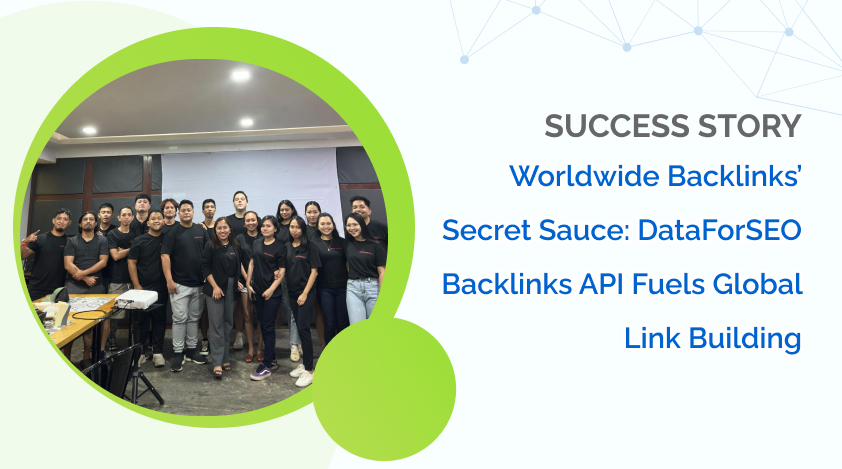
blog image worldwide backlinks with dataforseo
Customer success story

Worldwide Backlinks’ Secret Sauce: DataForSEO Backlinks API

Learn more
Worldwide Backlinks img

"DataForSEO has always been in our tool kit. I guess the most simple way to put it is that when you explore a tool's API, you can see what it is really capable of. DataForSEO also provides awesome documentation to utilise.”

logo-linkedin
Callum Sherwood Connect on LinkedIn

Join DataForSEO No-Code Community on Discord!

Join Now
dfs discord

DataForSEO is ready when you are