
The fastest way to access our data is not to call the API yourself. Using the DataForSEO MCP server, you can get the first results in just 2-3 minutes. No coding required and no need to set up complex integration workflows.
What’s the secret? MCP allows your AI model to read our documentation directly and make API calls automatically, without searching the web – all context and instruments are in the model’s hands.
The combination of the DataForSEO MCP server and AI can streamline your SEO and marketing workflows like never before. Besides, it makes developers’ lives easier – the MCP can suggest and assist with API integration workflows for any type of project. In this article, we’ll demonstrate the power of the DataForSEO MCP server in five real-world use cases.
1 Use AI as an on-demand, fast SEO assistant
Suppose you need to run a quick SEO check for your customer or prepare a small report. Usually, even a small task requires compiling information from multiple tabs of an SEO tool you use. Now, you can ask AI directly and get structured, data-backed insights.
DataForSEO MCP server effectively turns the LLM model you use into an on-demand SEO assistant. With the server plugged in, you can describe your task in conversational format, and the AI will do the rest: explore documentation, fetch data, run analysis, and generate results based on the data. Besides, you can connect the server to popular LLMs in a couple of minutes using the OAuth protocol – we cover the setup in this Help Center guide.
Let’s see the MCP server in action. For example, here’s a prompt with an SEO task we can send to Claude with the DataForSEO MCP server connected:
“Who ranks in the top 10 for ‘project management software’ in the US right now, which SERP features appear, and does the AI Overview cite any of them?”
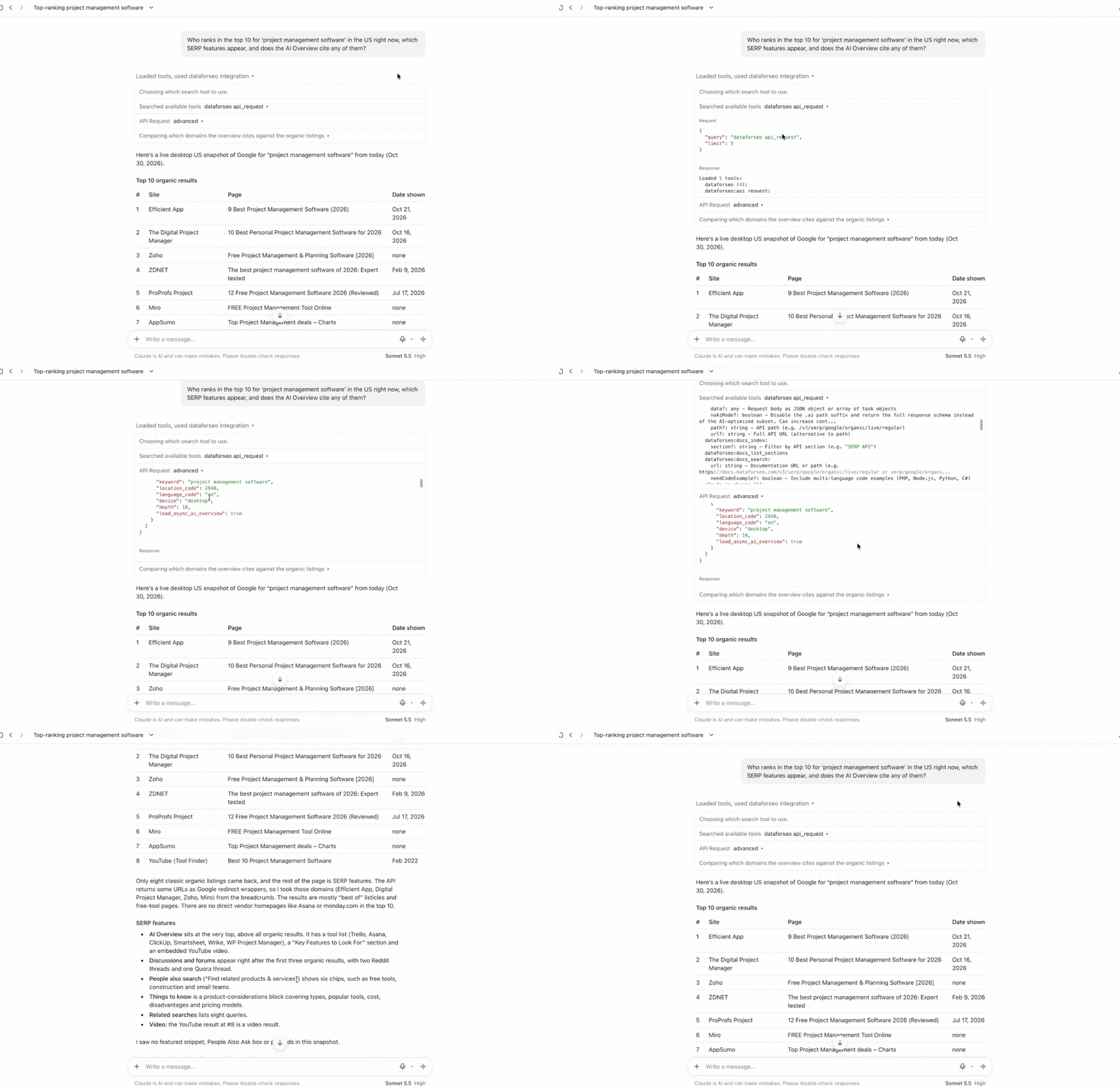
Here’s the result. Claude used the MCP server to find and call the Google Organic SERP API endpoint. Then, it pulled the SERP data to generate a detailed overview of the top organic results, the SERP features that appeared, and the websites cited in the AI Overview.
The key aspect here is that AI does everything automatically, from reading the documentation to interpreting data. You don’t need to know or specify which APIs to call – the LLM will select the right APIs and structure requests correctly.
Moreover, you can continue the conversation by asking follow-up questions or sending new tasks to deepen the analysis. Let’s, for example, ask Claude to compare estimated organic traffic, backlink profiles, and ranked keywords of the top 3 domains from the result:
“Take the top three domains from these results and compare them: estimated organic traffic, number of ranking keywords, and backlink profile. Which one would be easiest for us to compete with?”
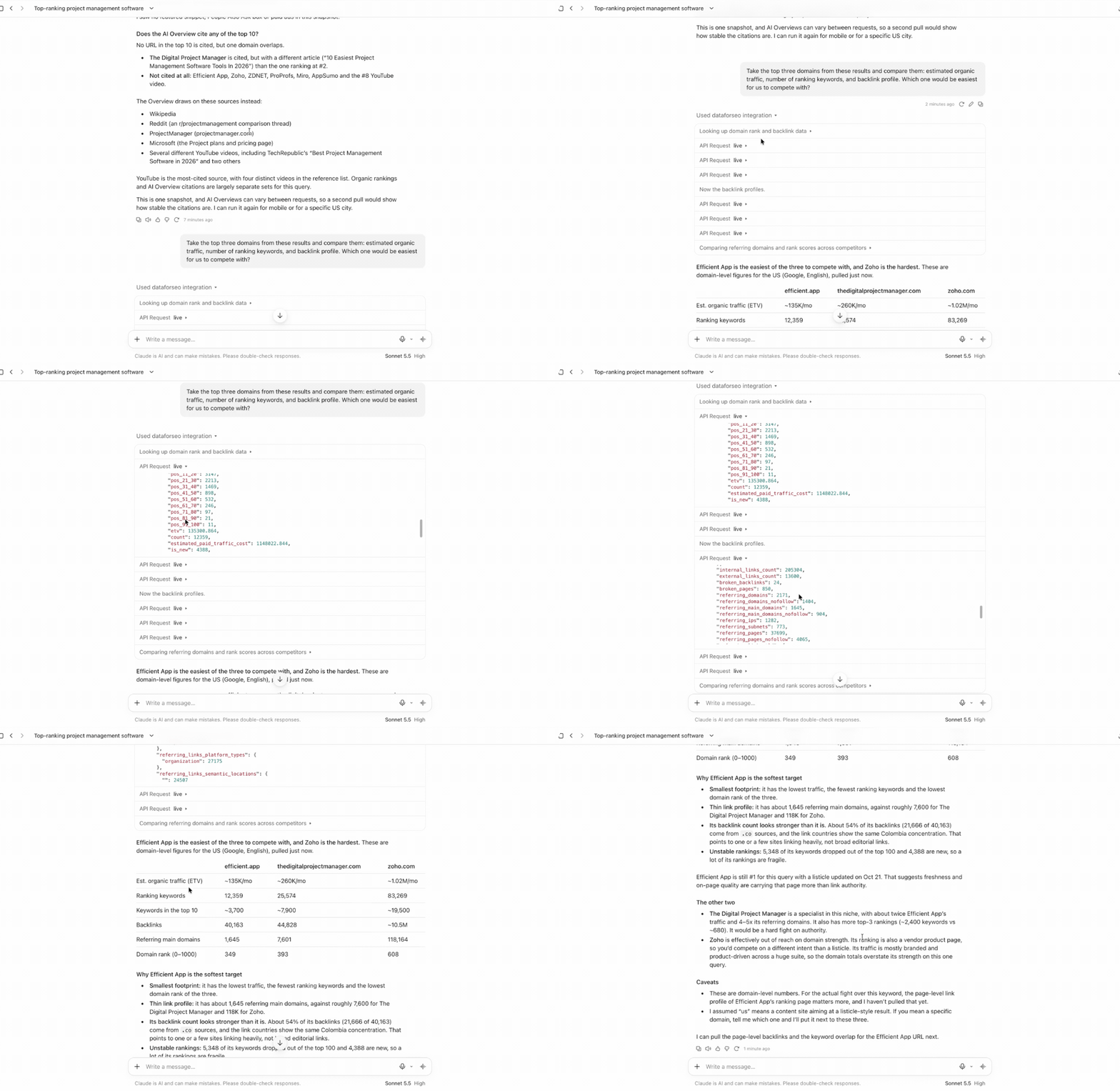
For this task, Claude first called the Domain Rank Overview endpoint for each domain to get ranking and traffic data. Then, it pulled backlink profiles using the Backlinks Summary endpoint. The result is a compact but data-based domain comparison report, from which we can see why efficient.app is the easiest to compete with in search, and zoho.com is the hardest.
As you can see, in just 2-3 minutes, you can run an analysis of SERP competitors, understand their authority in search, and whether it is possible to compete with them. Similarly, you can run other daily SEO tasks on demand and get fast results based on real insights, not assumptions.
Another argument for doing routine SEO work with the AI and MCP combination is cost. For endpoints called via the MCP server, the same pay-as-you-go pricing rules apply, with no additional charges. That means you pay only for making API requests and retrieving the data, and this on-demand SEO assistant costs nothing when idle.
In our case, Claude made 7 calls to the following DataForSEO API endpoints in total:
- Google Organic SERP API Live Advanced – 1 call with
load_async_ai_overviewparameter enabled = $0.004 subtotal. - DataForSEO Labs Domain Rank Overview – 3 calls = $0.0364 subtotal.
- Backlinks Summary – 3 calls = $0.0721 subtotal.
Adding up all the subtotals, the total cost is just $0.1125. That’s it: a quick SEO analysis using an LLM and the DataForSEO MCP server can cost less than a quarter.
That’s one of the simplest, yet effective use cases for our MCP server. You can handle much more complex tasks with it, such as building extensive, customer-ready reports from scratch, as we’ll see in the next section.
2 Generate client-ready SEO reports with Claude Code skill
Building detailed, multi-page SEO reports for customers or for lead conversion is a routine but time-consuming process that requires significant resources and attention. However, it can become a problem when you need to prepare multiple reports simultaneously or don’t know where to start or what to highlight.
Fortunately, with the DataForSEO MCP server and Claude Code, you can streamline even this complex process and generate customer-ready reports in hours or even minutes. Our custom SEO Visibility Report Claude Code skill makes this possible.
After installation, the skill allows you to produce a complete SEO report for any domain. The report is suitable both for presenting to a client’s management and for internal use within your team. It covers multiple aspects of a domain’s SEO visibility, from ranking opportunities to website health. But the most important point is that nothing in the report is made up or roughly estimated – everything is based on our data, pulled by the MCP server.
So, how do you actually generate such a report with this skill? You prompt Claude Code to build an SEO report, then answer a few questions about the report structure and a customer.
Here is what it looks like in the desktop version of Claude Code:
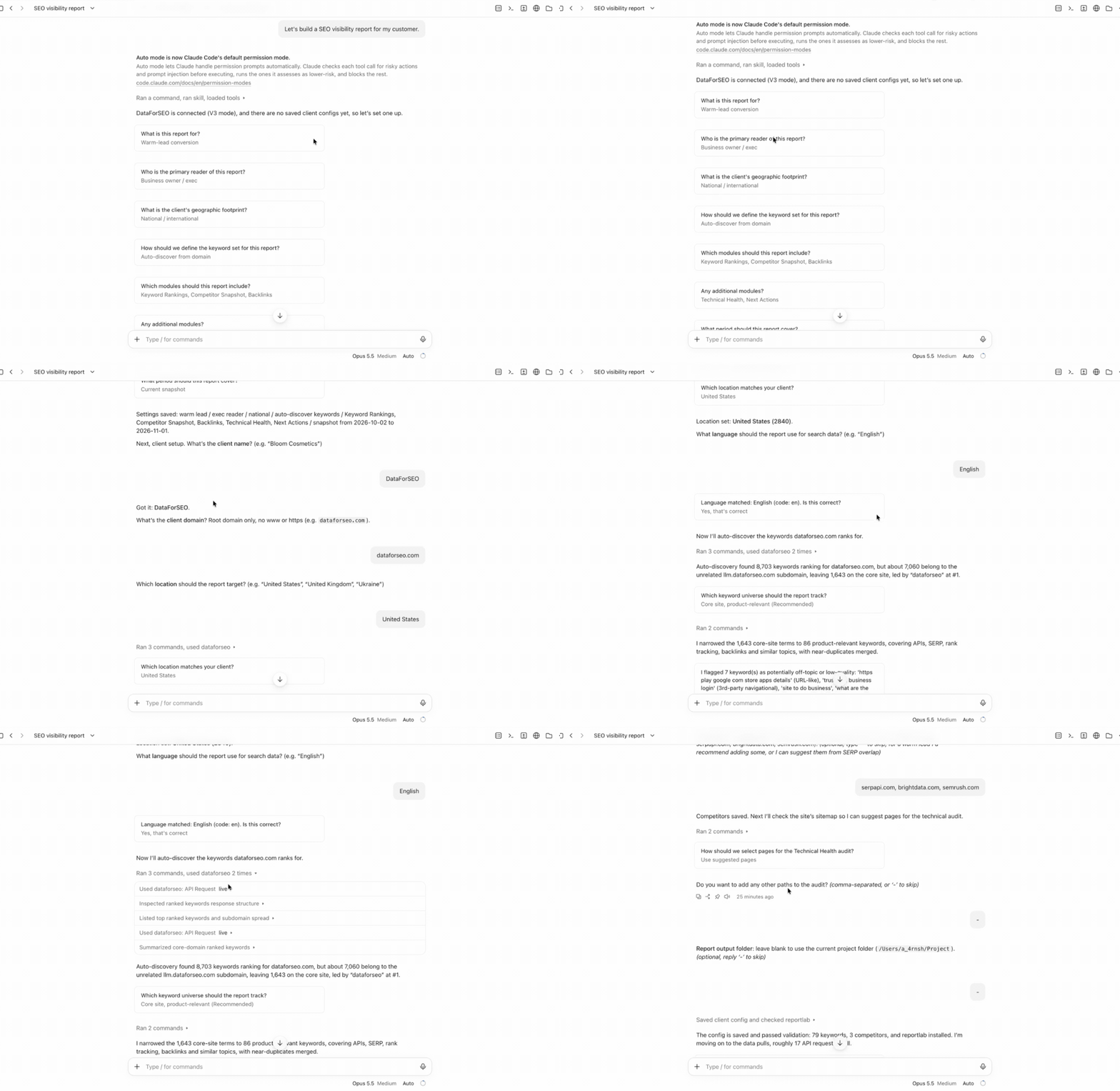
The AI asks you what this report is for, who will read it, which modules it should include, and what period it covers. After that, it confirms the report structure, list of target keywords, and main competitors. If nothing needs to be changed, the AI starts pulling data and assembling the report.
The generated report looks like this:
As you can see, the report comes with both granular and aggregated information on the domain’s SEO visibility. The customer can quickly assess overall SEO performance and dive into details such as changes in the number of referring domains and ranked keywords. The report also includes a list of actions to improve the website’s visibility – a section that can be especially important for executives.
With the SEO Visibility report skill and DataForSEO MCP server, you can be making such extensive reports on a regular basis. The skill streamlines the process and makes the workflow repeatable – for the same customer, you won’t need to start over; the information is stored inside your project folder. The MCP server automatically supplies all the data required for the report by calling the relevant APIs.
Overall, this solution is invaluable for SEO specialists and consultants who often handle reporting. It also requires minimal input, and you can customize what goes into the report, which is useful when you don’t know where to start.
3 Work on SEO for your projects without leaving the IDE
Improving a website’s health and search performance usually consists of two parts. First, you run numerous on-page checks using an SEO tool of your choice or custom scripts that can identify technical issues. Then you prepare an action plan based on the results and either give it to your developer to implement on the website or do it yourself. Now, you don’t need to run SEO checks separately and review the action plan – you can do all of that inside an Integrated Development Environment (IDE) you use for working on your web projects.
Today, various IDEs offer different AI-powered features and can connect to custom MCPs. Cursor is one of the most popular and powerful IDEs of this kind. With the DataForSEO MCP server connected, you can easily run an on-page analysis for a website and its pages straight in the Cursor environment.
The connection process is straightforward. It uses a small configuration snippet and the OAuth authentication method, the same as one we covered earlier. After connecting MCP, open your project, start a new chat, and prompt Cursor to run an on-page check.
Example: “Run an on-page SEO check for dataforseo.com main page and SERP API, Solutions, Integrations and Lead Enrichment landing pages. Propose an action plan for each page: what needs to be improved, fixed, and how.”
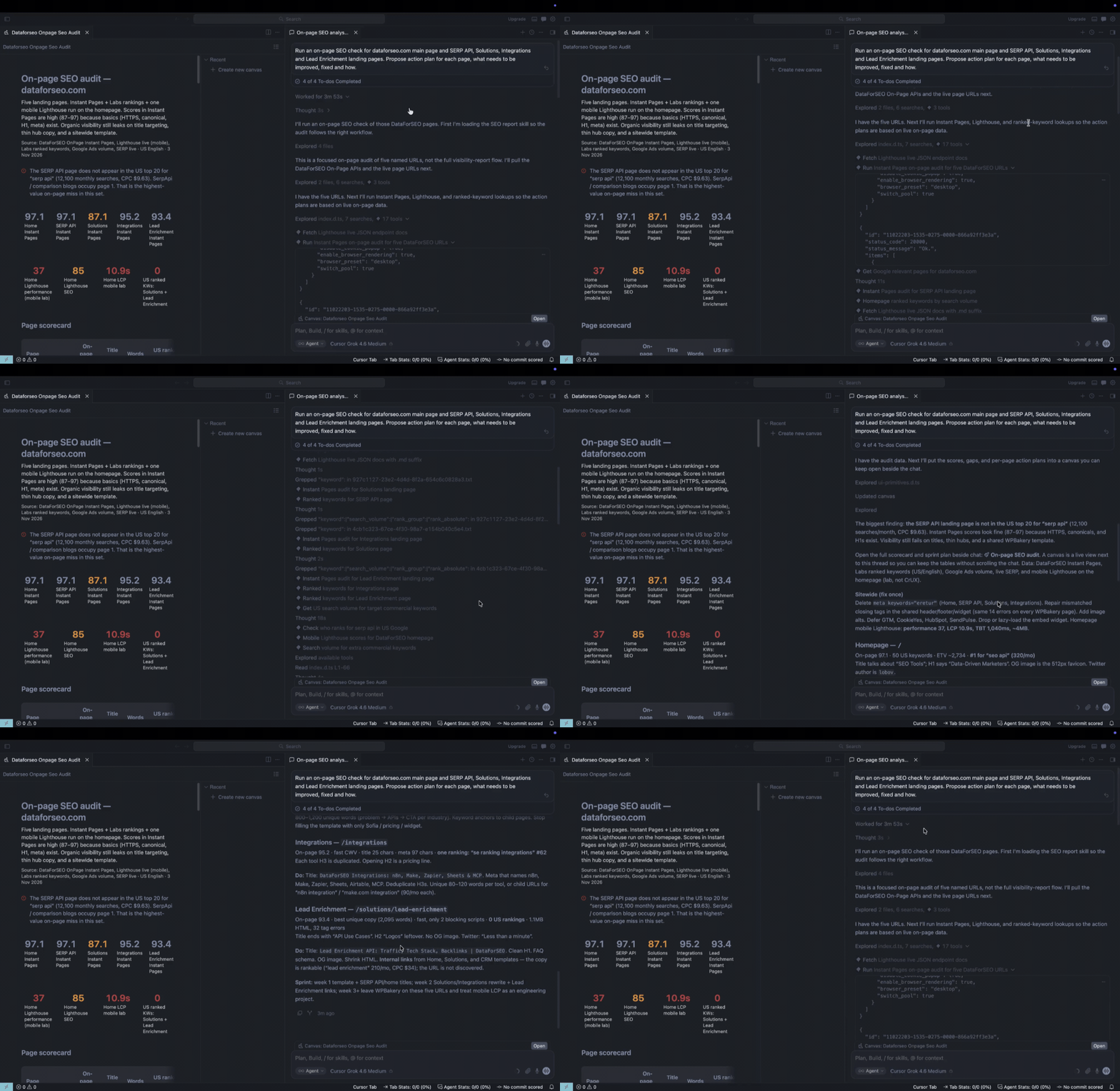
After three minutes, Cursor generated a comprehensive on-page report and action plan for five website pages with detailed recommendations. To analyze each page, it called dedicated endpoints of the OnPage API, such as Instant Pages and Lighthouse. You can explore the returned audits in JSON to verify every suggestion. Then, you can open the website repository and implement changes directly, without leaving the IDE.
What makes this integration even more beneficial is that you can use it with any other existing project or when working on new ones. With DataForSEO MCP assistance, it is possible to design pages or solutions with SEO-optimized features and structure, based on real data. This way, you can significantly streamline your development process and save additional time on other necessary tasks. In particular, the DataForSEO MCP server can be helpful when developing the integration architecture to connect our APIs to your tool.
4 Speed up DataForSEO API integration into your SEO tool
As you plan a large-scale integration of DataForSEO APIs into your tool, our MCP server can assist you throughout the entire process. It provides AI models with direct access to our extensive documentation index. That means LLMs can read, analyze, and summarize all available information about all DataForSEO APIs without interruption or extra steps.
So, if you work on DataForSEO API integration using an AI-powered IDE, like Cursor or Claude Code, our MCP server can assist you with the following:
1. Suggest the best use case for DataForSEO APIs in your tool. Our data covers multiple aspects of SEO and GEO, and individual endpoints can be used to power various features simultaneously. This versatility can be confusing sometimes, especially when you don’t know which endpoint is best for powering a specific feature.
Our MCP server handles this issue perfectly: it provides not only documentation but also essential context on each API. This way, you can ask your AI agent direct questions about which APIs to integrate into your tool’s modules and features. Moreover, you can naturally query about different response fields, the types of data an endpoint can return, and which limitations exist.
For instance, here is how you can query Claude Code CLI with our MCP connected about which APIs to integrate into a keyword research tool. You can just open Claude Code in your repository and send a prompt like this:
“I’m building a simple keyword research tool. A user types a seed keyword and gets a list of related keywords with search volume, keyword difficulty, and search intent. Use the DataForSEO MCP server to find which DataForSEO endpoints fit this tool best. For each one, explain what data it returns and why it fits. Show the result as a short table and save it to plan.md.”
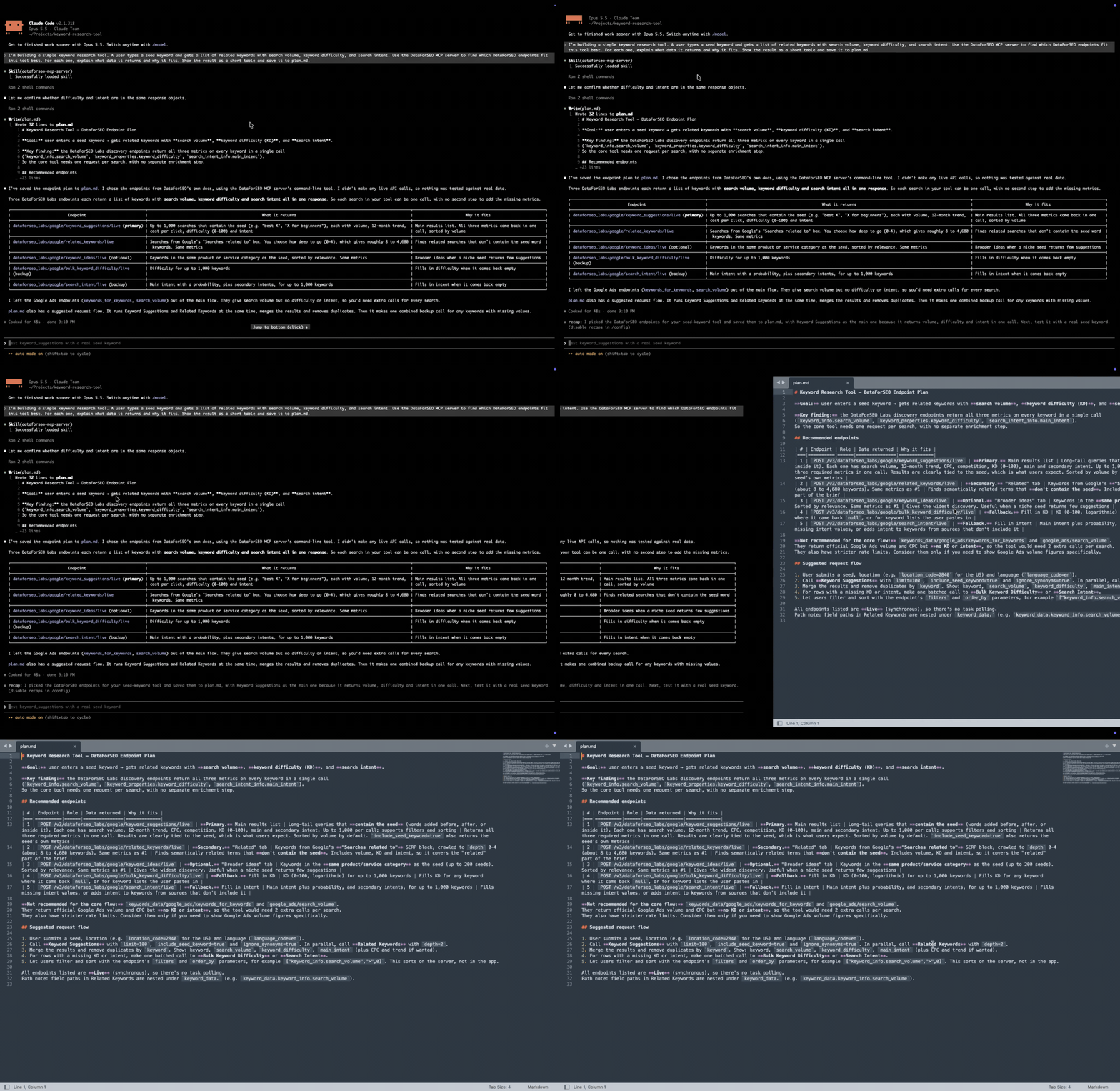
In less than a minute, Claude Code returned a detailed API integration plan that was verified against our documentation. In the plan.md file, the AI defined the main goal, listed recommended DataForSEO endpoints, and suggested a request flow for the tool. That’s how easy it is to brainstorm integration ideas for your tool with MCP.
2. Structure API request bodies correctly. Building proper request bodies for your tool to interact with our APIs is one of the key integration steps. Nearly every endpoint has unique request parameters, rules, and field-specific limitations. Not taking into account all the nuances can often result in failed requests and frequent fixes. On the other hand, well-structured requests and parameters can help you fetch more specific data and even reduce API usage costs.
The DataForSEO MCP server can help you structure such requests with AI in minutes. Your agent can browse all required and optional parameters for each endpoint, combine them into a working request, and write it in a programming language you use for integration. For example, if you integrate in Python, you will get Python snippets with correct syntax and structure, whether it is a Live mode request or a POST-GET sequence. Similarly, you can prompt it to update requests with new parameters or rewrite them in a different language.
The example below best illustrates the workflow. In the same chat where we prompted Claude Code to brainstorm ideas for a keyword tool, let’s send the following prompt:
“Now write the request bodies for the endpoints you picked, for the seed keyword “running shoes” in the United States, in English. Keep the requests as cheap as possible. Then write a short Python function that sends them. Save the request bodies to requests.json and the code to keyword_api.py.”
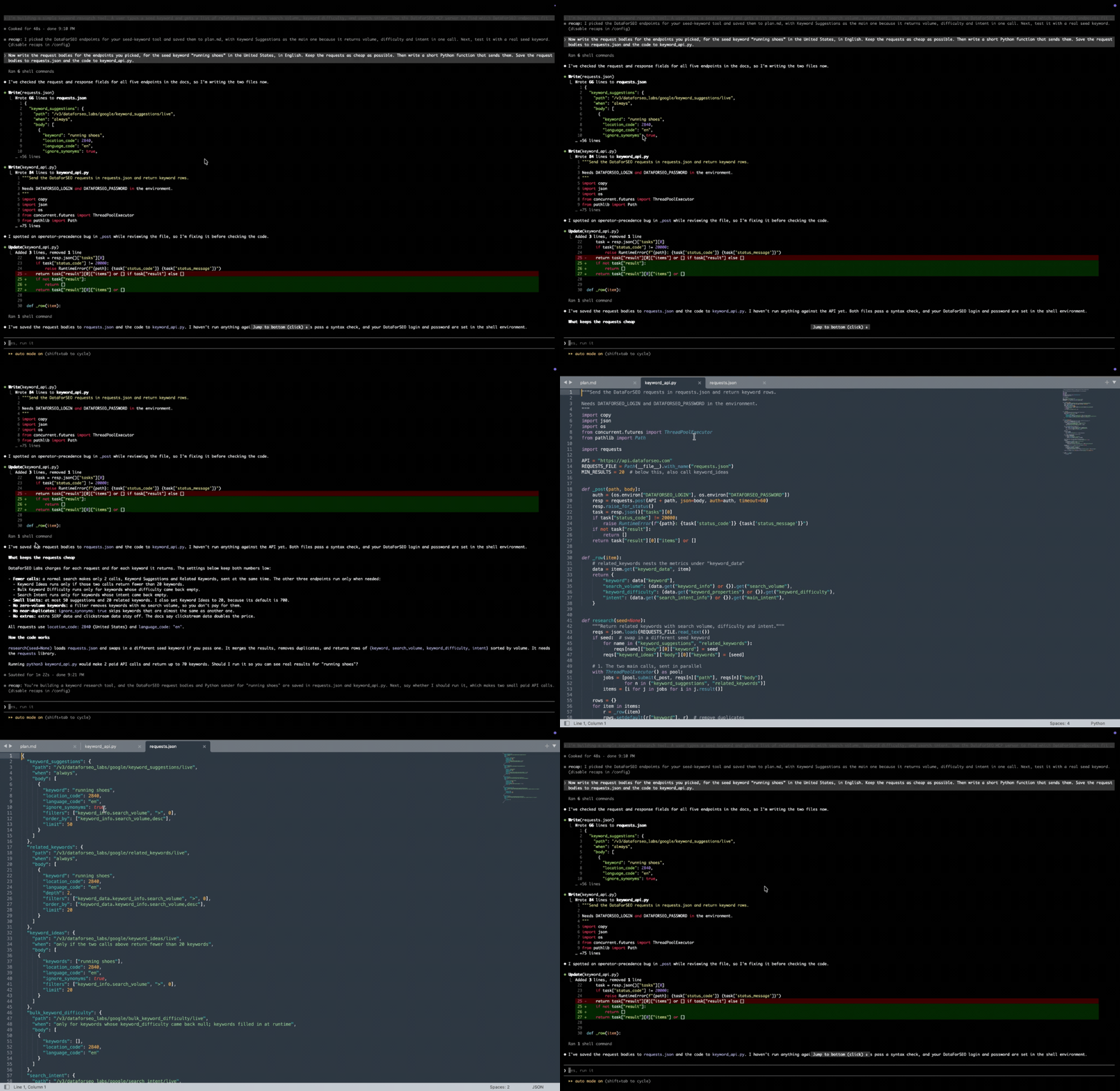
As you can see, Claude Code dealt with this task perfectly. It produced a JSON file containing request bodies for each endpoint it selected for the keyword tool, along with a working Python script to send these requests to the DataForSEO API.
3. Propose integration architecture ideas that will work for your tool. Planning the integration architecture is the most critical step, as it defines how everything will work between our APIs and your tool. However, even this high-level process can be streamlined using the DataForSEO MCP server. For example, you can use AI with our MCP to generate initial architectural ideas from scratch, skipping the lengthy discovery phase. Let’s send such a request to the Claude Code chat about your keyword tool:
“Suggest a simple integration architecture for this tool: how the frontend, our backend, a cache, and the DataForSEO API should connect, which requests run when a user searches, and what we should store so we don’t pay twice for the same data. Draw it as a simple text diagram and save it to architecture.md.”
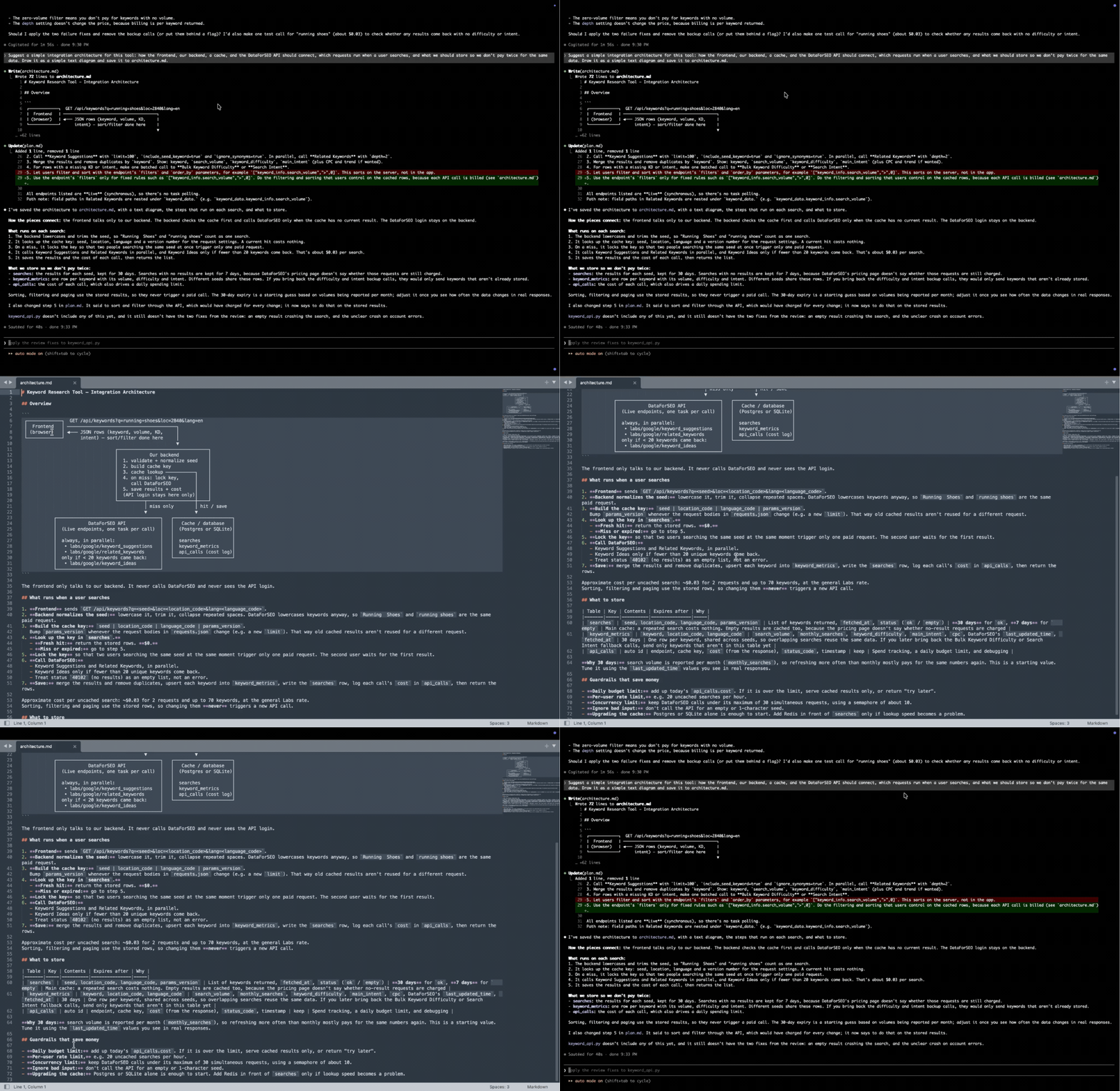
After consulting our documentation, Claude Code provided a structured example of an API integration architecture for your keyword tool. Besides, you don’t need to worry that some of the suggestions may be outdated. Our MCP server always provides access to the latest versions of the docs and all endpoints, including those released recently.
Overall, the DataForSEO MCP can significantly speed up the integration of our APIs into your solution. You can spend less time reading documentation or deciding which API is the best for your tool’s features – the AI can promptly give you workable and relevant integration options. All that’s left is to check whether these options meet your needs and adjust them manually if necessary – AI still can make mistakes, so human input remains vital.
5 Map a local market in one conversation
Local SEO and market research can be quite challenging for SEO experts or local business owners. Aside from the location factor itself, you need to take into account nuances in Google My Business profile completion, review management, and finding your true competitors.
In such a situation, it is often hard to determine where to start research and optimization efforts. For small businesses with a limited marketing budget, the issue becomes critical. But what if you could research your local market and competitors in one AI conversation?
The DataForSEO MCP server comes to the rescue once again. You name the business in a chat with an LLM, and it pulls structured data from our best APIs for local SEO, such as the Google Maps SERP API, Business Data API, and more. With the help of AI, these insights turn into an actionable brief that demonstrates your stance relative to local competitors.
Here is how it looks in practice. Suppose you are the owner of a dental clinic in Austin and want to know your true position among competitors in search results. You can send the following prompt to Claude with our MCP server connected:
“Who are the top 10 dentists in Austin on Google Maps? Compare their ratings, review counts, and categories with https://enameldentistry.com/saltillo-east-austin-dentist/ profile, and list the gaps. Use the DataForSEO MCP server to fetch the data.”
The result is as follows:
Claude called the Google Maps SERP API endpoint to fetch the top 10 results for “dentist” in Austin, and the API returned all the structured data about competitors in a single request. The AI distinguished true competitors from false ones and identified gaps in ratings, reviews, and categories.
In just one request, you got a comprehensive brief on your position in the local market, along with suggestions to improve it. Besides, AI offered to dive in further with a backlink and on-page comparison between your website and the competitor’s.
Here, Claude called the Backlinks Summary and Instant Pages endpoints and structured the results into a table with key metrics. In addition, it identified the gaps and proposed new suggestions to strengthen your position against this specific competitor.
This way, in just one AI conversation, you can map a local market with all competitors and have solid ground for launching your local SEO campaign. If your business has spots in different districts or even cities, you can run individual analyses and then merge results into an end-to-end local SEO strategy.
Conclusion
The DataForSEO MCP server is the shortest path from a question to a data-driven answer. With a single connection, your AI assistant gains access to every DataForSEO API and its documentation, and you pay only for the data it actually retrieves. This makes the server useful for a wide range of tasks, from quick checks to full development workflows. In particular, you can:
- Transform your AI agent into an on-demand SEO assistant that answers with real data in a couple of minutes.
- Build extensive, client-ready SEO reports that cover the full spectrum of SEO visibility insights.
- Run comprehensive on-page SEO checks and plan fixes without leaving your IDE.
- Accelerate DataForSEO API integration into your SEO tool, from choosing endpoints to reviewing the finished architecture.
- Explore the local market and benchmark a business against its competitors in one conversation.
The capabilities of our MCP server integration go far beyond that. Explore all connection options on the DataForSEO MCP server page, then try for free and build AI-powered workflows with real data that fit your own projects.