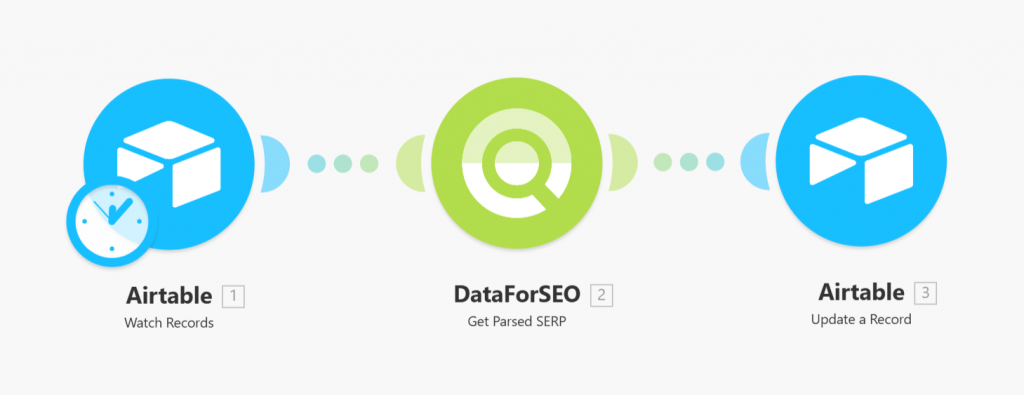
Quick overview
This workflow automatically updates your Airtable records with the latest Google SERP positions for specified keywords and target URLs. Using the DataForSEO SERP API, it retrieves ranking data whenever a new record is created, keeping your database current without manual searches or updates.
Who it’s built for
This template is perfect for SEO specialists, digital marketers, and analysts who track keyword performance and want an automated way to monitor SERP positions. It’s especially useful for teams managing multiple keywords and locations within Airtable.
Workflow breakdown
- The scenario triggers whenever a new record is added to your Airtable base.
- It reads the keyword, target URL, location, and language from the new record.
- The workflow calls the DataForSEO SERP API to fetch the current Google SERP position for that keyword-target combination.
- The retrieved ranking is written back to the Position field of the same Airtable record.
What you get
You get an automated system that instantly updates Airtable with current Google SERP positions for your tracked keywords. This keeps your database accurate, saves time on manual tracking, and allows you to analyze keyword performance and trends efficiently.
What you need to get started
- DataForSEO account and API credentials (your API login and password).
- An Airtable account with a table containing the fields: Keyword, Location, Language, Target, and Position
- An Make.com account configured to connect to Airtable and DataForSEO.