Quick overview
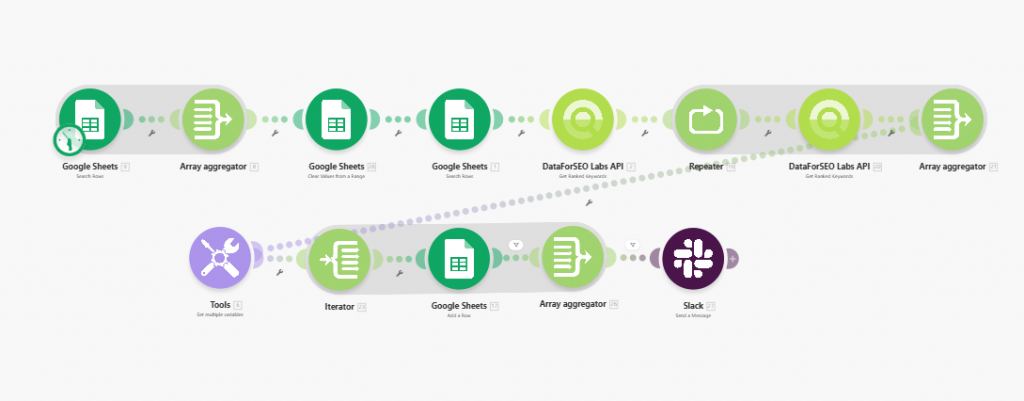
This Make.com template automates the process of retrieving newly ranked keywords from Google using the DataForSEO Labs API. Instead of manually checking keyword rank reports, this workflow pulls updated keyword ranking data, identifies fresh rankings, and makes the results available for analysis or further workflows, all without manual effort.
Who it’s built for
This template is ideal for SEO professionals, content marketers, digital analysts, and growth teams who need to stay informed about changes in keyword rankings. It’s especially helpful for teams tracking performance improvements, identifying opportunities, and maintaining up-to-date insights on keyword visibility.
Workflow breakdown
- The scenario runs on a set schedule or can be triggered manually.
- It calls the DataForSEO Labs API for the specified domains.
- Compares the results with the previous run.
- Puts ranked keywords into a selected Google Sheet.
- Sends a message to Slack.
What you get
You get an automated system that identifies and retrieves newly ranked keywords using real-time SERP data from the DataForSEO API. This workflow saves you time by eliminating manual rank checks and gives you timely visibility into keyword ranking changes so you can take data-driven action.
What you need to get started
- DataForSEO account and API credentials (your API login and password).
- A Make.com account with the DataForSEO, Google Sheets and Slack integrations connected.
- A spreadsheet in Google Sheets with your keywords that matches the required column structure (as in the example).
- A spreadsheet in Google Sheets with your target domains that matches the required column structure (as in the example).