Quick overview
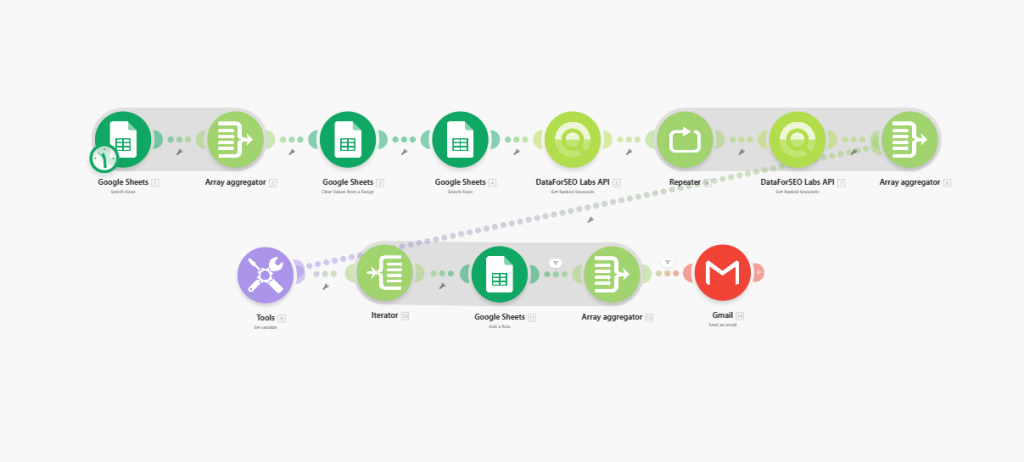
This Make.com template automatically detects when new keywords appear in Google’s AI Overview search results by using the DataForSEO Labs API. Instead of manually scanning result pages, the workflow identifies newly ranked AI Overview keywords and logs them giving you automated visibility into emerging search opportunities.
Who it’s built for
This template is ideal for SEO specialists, content strategists, data analysts, and marketing teams who want to monitor keyword momentum in Google’s AI-generated search results. It helps teams stay informed about new keyword rankings that could influence content strategy and search performance.
Workflow breakdown
- The scenario runs on a schedule or is triggered manually.
- It queries the DataForSEO Labs API for your selected domain.
- New AI Overview keywords are captured and recorded to Google Sheet for further use or analysis.
- Emails you the report via Gmail.
What you get
You get an automated system that tracks and logs emerging keywords in Google’s AI Overview results without the need to manually inspect search pages. This keeps you up to date on new ranking opportunities and helps inform SEO and content decisions based on the latest AI-driven search trends.
What you need to get started
- DataForSEO account and API credentials (your API login and password).
- A Make.com account with the DataForSEO, Google Sheets and Gmail integrations connected.
- A spreadsheet in Google Sheets with your keywords that matches the required column structure (as in the example).
- A spreadsheet in Google Sheets with your target domains that matches the required column structure (as in the example).