Quick overview
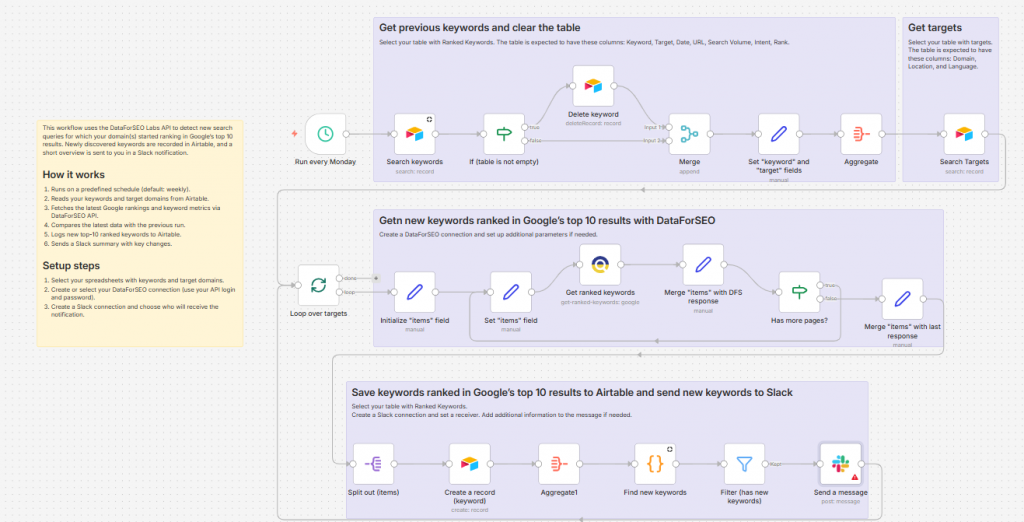
This workflow automatically tracks when new keywords enter Google’s top‑10 search results and logs them to Airtable, while also sending Slack notifications to keep your team up to date. By using the DataForSEO API, the scenario identifies fresh high‑ranking opportunities and keeps your Airtable database synchronized without manual tracking or data entry.
Who it’s built for
This template is perfect for SEO professionals, growth marketers, and digital teams who want to monitor improvements in search visibility and share updates with their team in real time. It’s especially useful for teams managing multiple target keywords and collaboratively acting on emerging opportunities.
Workflow breakdown
- The scenario runs on a schedule (e.g., daily or more frequently).
- It calls the DataForSEO API with your selected domains.
- The workflow identifies keywords that have newly reached a top‑10 ranking compared to previous data.
- New top‑10 keyword entries are logged as rows in an Airtable base.
- A Slack alert is sent with details of the newly ranked keywords to notify your team instantly.
What you get
You get an automated keyword monitoring system that logs new top‑10 rankings in Airtable and delivers real‑time alerts via Slack. This keeps your keyword insights centralized, up to date, and visible to your team without manual checking. The result is a streamlined way to surface and act on SEO opportunities quickly and collaboratively.
What you need to get started
- DataForSEO account and API credentials (your API login and password).
- Airtable table with your keywords, following the required column structure.
- Airtable table with your target domains, following the required column structure.
- A Slack workspace and channel connected in n8n
- An n8n instance configured with the necessary integrations