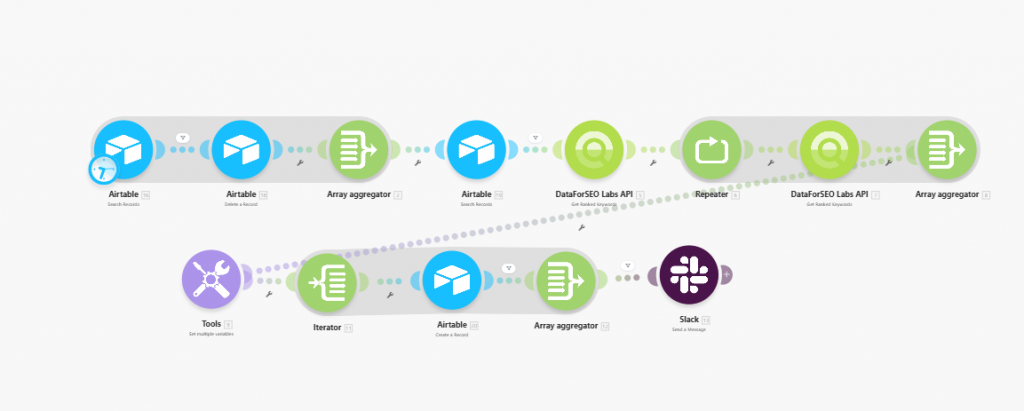
Quick overview
This template automatically tracks when your website starts ranking in Google’s top 10 results for new keywords and logs those opportunities in Airtable. Using the DataForSEO Labs API, the workflow regularly checks ranking data for your domain, compares the latest results with previously stored records, and saves newly discovered top-10 keywords to Airtable for easy tracking and analysis.
Who it’s built for
This workflow is designed for SEO specialists, digital marketing teams, and agencies that want to automatically monitor new ranking wins. It is especially useful for teams that track keyword growth and want to quickly capture new top-10 rankings without performing manual SERP checks.
Workflow breakdown
- The scenario runs on a scheduled basis (for example, once a week).
- It sends a request to the DataForSEO Labs API to retrieve the latest keyword rankings for your domain.
- The workflow compares the new ranking data with the records stored from the previous run.
- If new keywords appear in Google’s top-10 results, the workflow identifies them as new ranking opportunities.
- Each new keyword is automatically logged in Airtable as a new record, along with relevant SEO metrics.
- Sends a Slack summary of newly discovered rankings.
What you get
You get a continuously updated Airtable log of newly discovered keywords where your website has entered Google’s top-10 search results. This gives you a clear record of new ranking wins, helping you track SEO progress, identify growing search visibility, and prioritize optimization or content expansion around the keywords where your site is gaining traction.
What you need to get started
- DataForSEO account and API credentials (your API login and password).
- A Make.com account.
- An Airtable table where new top-10 keyword records will be stored.
- An Airtable with target domains.