Quick overview
This template automatically retrieves Google Ads keyword metrics for your keyword list and updates them in Google Sheets using the DataForSEO API. Instead of manually checking keyword data in tools like Google Keyword Planner, the workflow pulls the latest metrics, such as search volume and competition and adds them directly to your spreadsheet for easier analysis and reporting.
Who it’s built for
This workflow is designed for SEO specialists, PPC managers, digital marketers, and marketing teams who need quick access to reliable keyword metrics. It is especially useful for professionals who manage keyword lists in spreadsheets and want to automatically enrich them with up-to-date search volume and advertising data.
Workflow breakdown
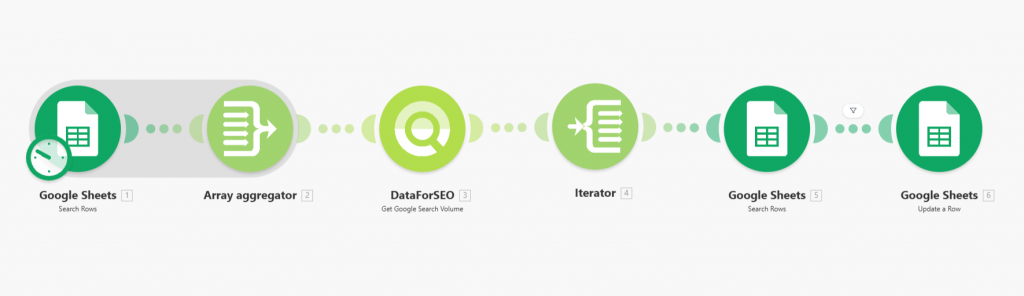
- The scenario runs on a schedule or whenever you trigger it manually.
- It reads the keyword list from Google Sheets. The sheet is expected to contain columns such as Keyword, Location, and Language.
- The workflow sends a request to the DataForSEO API to retrieve keyword metrics.
- The API returns data such as search volume, competition level, and cpc for each keyword.
- The scenario processes the response and maps the returned metrics to the corresponding rows in Google Sheets.
- Your spreadsheet is automatically updated with the latest keyword data.
What you get
You get a continuously updated Google Sheets document containing your keywords enriched with important Google Ads metrics such as search volume, competition level, and cpc. This allows you to quickly analyze keyword potential, prioritize SEO or PPC opportunities, and maintain an organized keyword database without manual exports or repeated checks in external tools.
What you need to get started
- A Make.com account with Google Sheets and DataForSEO connections.
- DataForSEO account and API credentials (your API login and password).
- A Google Sheets spreadsheet containing at least the following columns: Keyword, Location, Language.