Quick overview
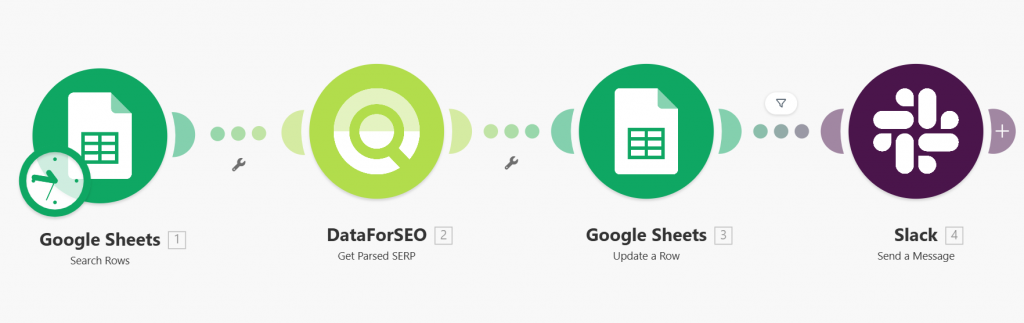
This template helps you monitor keyword ranking changes and get instant alerts when positions drop. It connects DataForSEO with Google Sheets and Slack to automatically check rankings for your tracked keywords, update your spreadsheet with the latest data, and notify your team whenever a ranking decline is detected.
Who it’s built for
This workflow is ideal for SEO specialists, marketing teams, and website owners who want to keep track of important keyword rankings and quickly react to visibility drops. It’s especially useful for teams that manage keyword tracking in Google Sheets and rely on Slack for notifications and collaboration.
Workflow breakdown
- The scenario runs on a schedule and checks keyword rankings using the DataForSEO API.
- It retrieves the latest ranking data for each keyword, target domain, location, and language listed in your Google Sheet.
- The workflow updates the corresponding rows in Google Sheets with the latest ranking information.
- If a keyword’s ranking position drops compared to the previous result, the workflow automatically sends an alert message to Slack.
What you get
You get an automated keyword monitoring system that keeps your Google Sheets ranking data up to date while also sending Slack notifications when positions drop. This allows you to quickly detect ranking losses, investigate potential SEO issues, and react before traffic is significantly affected.
What you need to get started
- DataForSEO account and API credentials (your API login and password).
- A Google Sheets document containing the columns Keyword, Target, Location, Language, Rank, UpdatedAt.
- A Slack workspace for receiving ranking alerts.
- Connected DataForSEO, Google Sheets, and Slack integrations in Make.