Quick overview
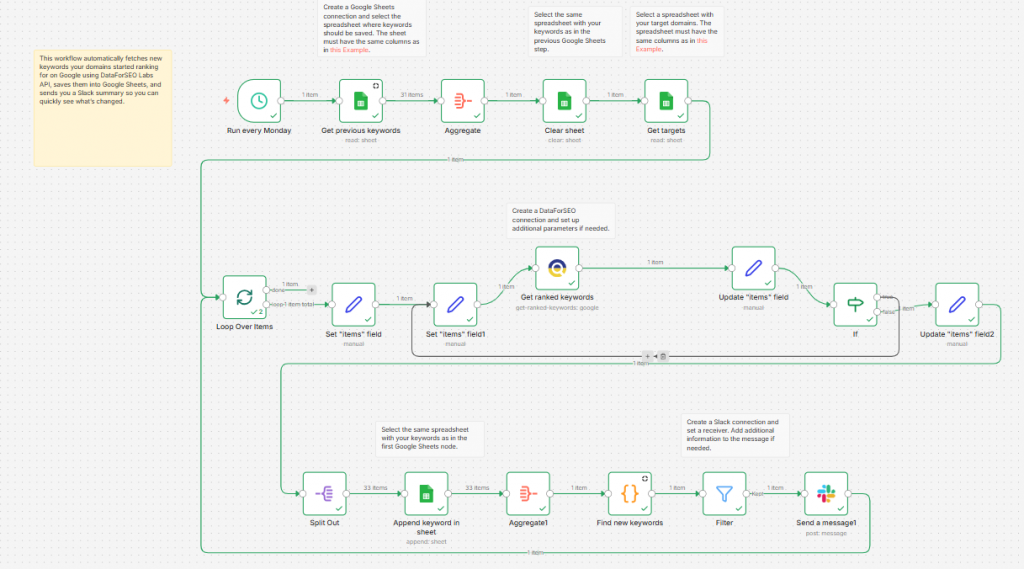
This workflow automates the tracking of newly ranked keywords using the DataForSEO API and logs results into Google Sheets while sending alerts via Slack when new rankings are found. Instead of manually checking order changes or exported keyword lists, this workflow keeps your sheet updated and notifies your team in when opportunities arise.
Who it’s built for
This template is ideal for SEO specialists, digital marketing teams, and content strategists who need to stay informed about new keyword rankings without manual monitoring. It works especially well for teams collaborating on search performance, content prioritization, and growth tracking.
Workflow breakdown
- The scenario is scheduled to run at regular intervals (e.g., weekly).
- It calls the DataForSEO Labs API for your specified domain.
- The workflow identifies newly ranked keywords not previously logged.
- New keywords are added as rows in a Google Sheets spreadsheet.
- A Slack message is sent with details of the new rankings to notify your team instantly.
What you get
You get an automated system that continuously watches for new keyword rankings and writes them into Google Sheets while delivering real‑time Slack alerts. This keeps both your data platform and your team aligned with the latest search performance changes without manual effort.
What you need to get started
- DataForSEO account and API credentials (your API login and password).
- A spreadsheet in Google Sheets with your keywords that matches the required column structure (as in the example).
- A spreadsheet in Google Sheets with your target domains that matches the required column structure (as in the example).
- A Slack workspace with a channel connected in n8n.
- An n8n instance configured with DataForSEO, Google Sheets, and Slack integrations.