Quick overview
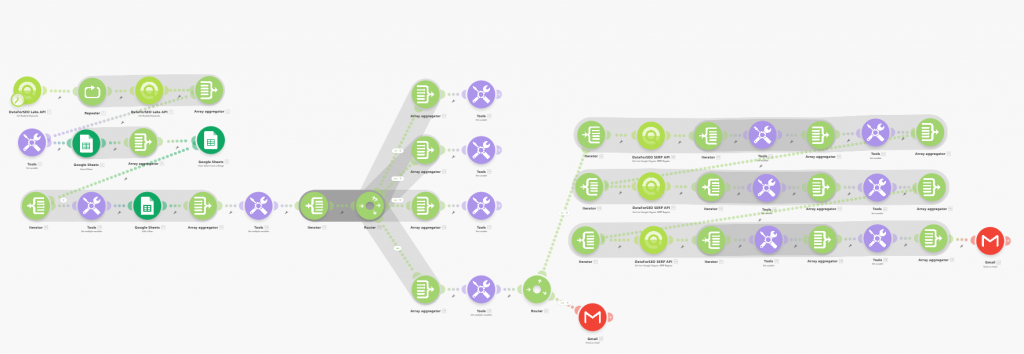
This Make.com template automates monitoring search position changes for your priority keywords and alerts you via Gmail when any keyword drops out of the top 10 search results. By connecting to the DataForSEO API, the workflow regularly checks keyword rankings and sends an email alert when a significant drop is detected, helping you stay on top of SEO performance without manual checks.
Who it’s built for
This template is ideal for SEO professionals, digital marketers, website owners, and growth teams who want real-time awareness of important ranking shifts. It’s especially useful for monitoring high-priority keywords where maintaining visibility in the top search results is critical to sustained traffic and conversions.
Workflow breakdown
- The scenario runs on a scheduled basis (e.g., weekly or more often).
- It calls the DataForSEO Labs API to retrieve current positions for the keywords.
- The workflow compares the latest rankings with previous data to determine whether any have dropped out of the top 10.
- If drops are detected, a Gmail alert is generated containing details of the affected keywords.
- The alert email is sent to your inbox with the updated ranking information.
What you get
You receive automated Gmail alerts whenever one of your tracked keywords falls below the top 10 search positions, giving you timely insight into ranking changes without having to manually monitor results. This enables faster reaction to performance shifts, letting you investigate issues and adjust your SEO strategy more effectively.
What you need to get started
- DataForSEO account and API credentials (your API login and password).
- A Gmail account connected in Make.com
- Google Sheets spreadsheet with your keywords, following the required column structure (as in the example).