Quick overview
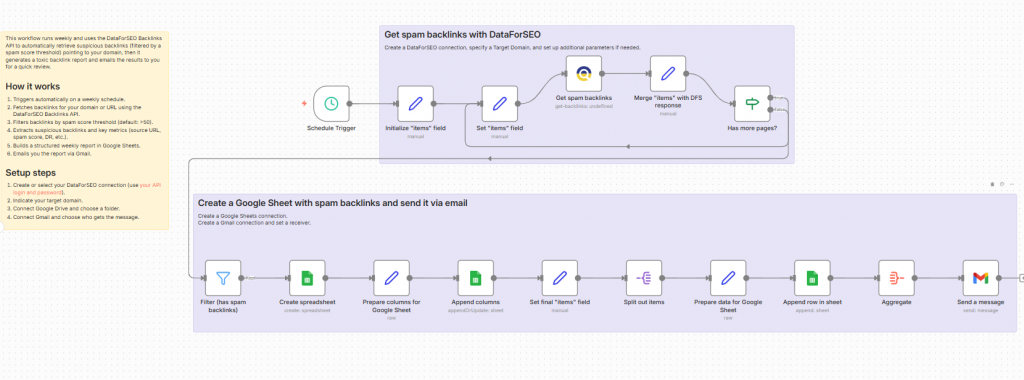
This workflow automates weekly monitoring of toxic backlinks by pulling spam-scored backlink data from the DataForSEO Backlinks API and saving it to Google Sheets. Each week, it generates a structured report listing potentially harmful links, helping you track backlink quality over time and stay ahead of SEO risk factors – all delivered without manual effort.
Who it’s built for
This template is ideal for SEO professionals, webmasters, link-building specialists, and digital marketers who want to keep a regular pulse on their backlink profile. It’s especially useful for those focused on maintaining a clean link profile, improving SERP performance, and proactively identifying spammy or toxic links before they impact SEO.
Workflow breakdown
- The scenario runs on a scheduled weekly basis.
- It queries the DataForSEO Backlinks API for backlink data on your selected domain or URL.
- The workflow filters links based on a defined spam score threshold.
- Identified toxic backlinks are structured into rows and compiled into a Google Sheets report.
- Emails you the report via Gmail.
What you get
You receive a fully automated weekly backlink quality report in Google Sheets that highlights links with potentially damaging spam scores. This gives you a consistent, organized view of harmful backlinks over time without manual searching or exports. The structured data is easy to review, filter, and share, helping you track link profile trends and support informed SEO decisions each week.
What you need to get started
- DataForSEO account and API credentials (your API login and password).
- A Google Sheets integration to n8n.
- A Gmail integration to n8n.