

The Path to Understanding Ad Impressions in DataForSEO APIs

Since the writing of this article, there have been some changes in the availability of impressions data. As of March 2026, it is only available in the Google Ads Ad Traffic by Keywords and Bing Keyword Performance endpoints of the DataForSEO Labs API.
The concept of ad impressions is pretty straightforward at first sight: it represents the number of times a certain ad was viewed. Although this explanation makes sense, the way Google, and hence DataForSEO, calculate ad impressions is more complicated than it seems.
Let’s figure out the true meaning behind ad impressions, what parameters it involves – and last but not least – how this metric is reflected in DataForSEO.
Impressions in Digital Marketing
Digital marketing has made ad impressions the ultimate quantitative metric of online advertising.
It all started out in October 1994, when AT&T bought the first banner ad on hotwired.com. The simple and yet groundbreaking “Have you ever clicked your mouse right here? – You will” campaign reportedly had a 44% click-through rate. However, it wasn’t possible to measure the overall reach because, well, the right metric had not been invented yet.
Everything changed a year later with the introduction of the CPM (Cost Per Mille) as the first pricing model for digital advertising. But it wasn’t until 2004 that the advertising industry established detailed guidelines for measuring ads impressions.
Fast forward in 2019, the Interactive Advertising Bureau (IAB) defines ad impressions as:
“a measurement of responses from an ad delivery system to an ad request from the user’s browser, which is filtered from robotic activity and is recorded at a point as late as possible in the process of delivery of the creative material to the user’s browser – therefore closest to actual opportunity to see by the user.”
Depending on the platform and the type of marketing campaign, impression tracking can involve various metrics, such as:
- PPC (pay-per-click) impressions, which are measured by the number of clicks received by the ad. This approach is used in Google Ads.
- CPM (cost-per-mille) impressions, which means cost per one thousand displays (or views) of an ad. CPM is used for tracking impressions across many ad networks, including Google Ad Network.
- CPA (cost-per-acquisition) impressions, which means that the advertiser pays only if a purchase is made. Google Ads uses the CPA metric as a part of its Smart Bidding feature to determine the cost of a paid conversion received from an ad.
Of course, there are more impression tracking models, but the above three are the most widespread in the Google Advertising ecosystem, which we’ll be discussing further below.
Impressions in Google Ads
If you’re even merely familiar with how Google Ads works, you should know the advertiser only pays for the click on the ad that gets a visitor to a certain webpage. Consequently, the number of times the ad is viewed counts as impressions.
You can view the impressions a keyword can potentially receive in Google’s Keyword Planner.
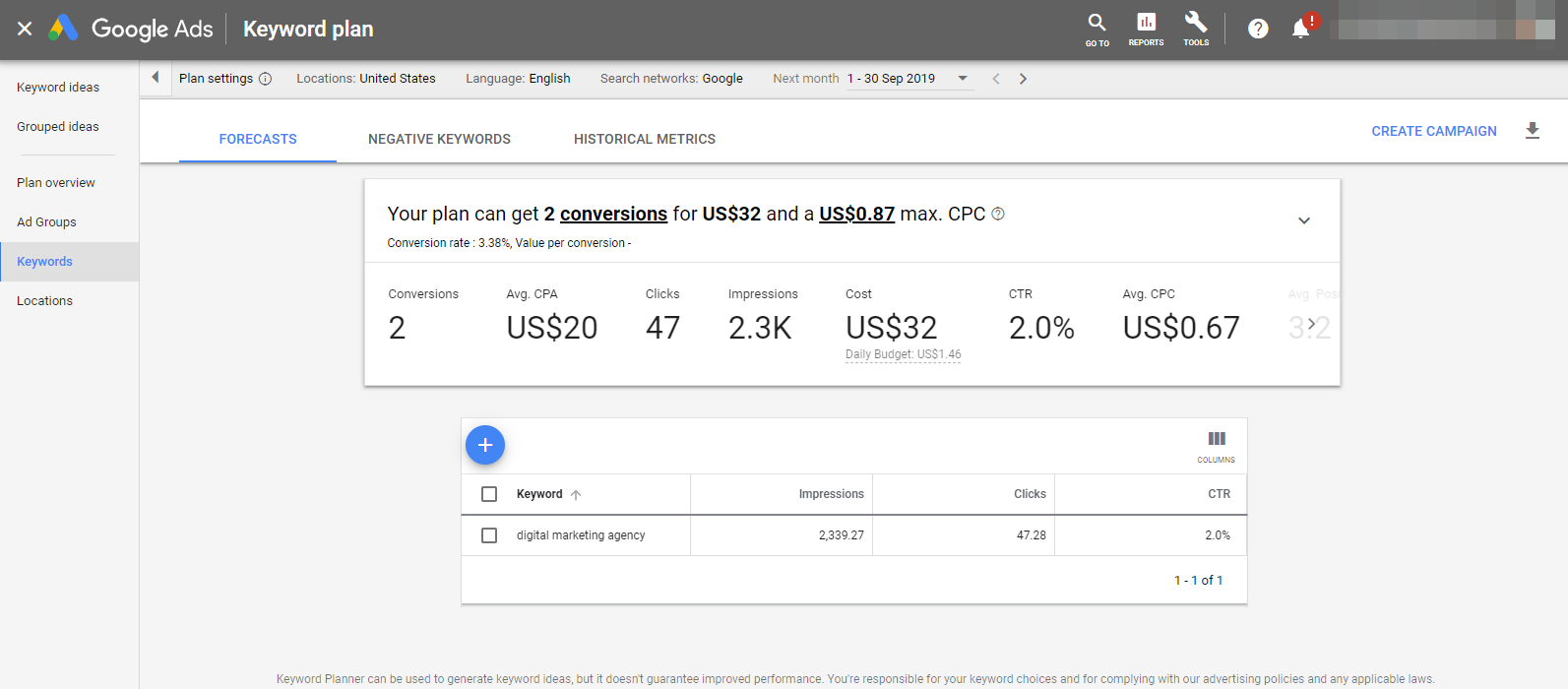
This number is based on historical data and correlates with the target bid price. At DataForSEO we’ve also seen situations when the number of impressions for the same keyword, location, language, and bid were different for two individual Google Ads accounts.
Even though impressions are a core metric of Google Ads, it represents a very approximate number. That’s the reason why Google provides two different impression values for the same keyword: e.g., daily minimum and daily maximum. Users can thus figure out the range of impressions their ad may get, and adjust the target bid accordingly.
Impressions vs Search Volume
Monthly impressions and search volume metrics are quite similar in nature if you think about it. Both can be narrowed down to the number of searches that hit a specific results page and help to forecast the number of visitors coming to the page. In fact, if you compare monthly impressions for a keyword with its search volume, you’re likely to get similar numbers.
When Google started to hide the average monthly search volume, various SEO experts recommended using monthly impressions instead of it. There are, however, a few tricks to keep in mind:
- First and foremost, impressions are tied with ads, so if your keyword doesn’t trigger ads, you won’t get impressions data for it.
- Google provides impressions in a daily form for a reason. Running ads during the workweek and putting them on halt on the weekend is a common practice – advertisers know when their target audience is more likely to make a purchase. Consequently, since impression values are different for various days of the week, calculating a monthly number involves a certain trade-off.
- Nor Google, neither DataForSEO, provide historical impressions, so you can’t analyze seasonal variations and trends per se. But, as always, there’s a workaround: you can get over this limitation by storing impressions data on your own server.
- At the same time, using impressions data over search volume has one significant advantage — you get a lot more accurate numbers. There are only 80 possible values search volume can take. If that wasn’t enough, Google distorted even these approximate numbers by lumping together semantically related keywords and hiding them from users running low on their advertising budgets.
With search volume growing even more inconvenient and imprecise, impressions may not be the ideal proxy per se, but this metric can become an acceptable replacement if applied wisely. That is the reason why DataForSEO incorporated impressions data alongside search volume.
Useful read:
How SEO Tools Calculate Search Volume And How To Do It Right?
Impressions in DataForSEO
You’ll find impressions data in several DataForSEO APIs, viz: Ads Traffic By Keywords and many endpoints of DataForSEO Labs API.
Ads Traffic By Keywords
Using the Ad Traffic By Keywords endpoint, you can receive a set of stats for estimating impressions, CPC, and clicks. This data is really useful for estimating real demand for a specific keyword, as it is much more accurate than the regular search volume information, which shows the broad match estimation for a group of similar keywords.
Request Sample
POST: https://api.dataforseo.com/v3/keywords_data/google_ads/ad_traffic_by_keywords/task_post
[
    {
        "language_code": "en",
        "location_code": 2840,
        "match": "exact",
        "bid": 999,
        "keywords": [
            "seo marketing"
        ]
    }
]
Response Sample
{
    "version": "0.1.20211130",
    "status_code": 20000,
    "status_message": "Ok.",
    "time": "0 sec.",
    "cost": 0,
    "tasks_count": 1,
    "tasks_error": 0,
    "tasks": [
        {
            "id": "12011232-2806-0111-0000-30d39743fae5",
            "status_code": 20000,
            "status_message": "Ok.",
            "time": "0 sec.",
            "cost": 0,
            "result_count": 1,
            "path": [
                "v3",
                "keywords_data",
                "google_ads",
                "ad_traffic_by_keywords",
                "task_get",
                "12011232-2806-0111-0000-30d39743fae5"
            ],
            "data": {
                "api": "keywords_data",
                "function": "ad_traffic_by_keywords",
                "se": "google_ads",
                "id": "12011232-2806-0111-0000-30d39743fae5",
                "language_code": "en",
                "location_code": 2840,
                "match": "exact",
                "bid": 999,
                "keywords": [
                    "seo marketing"
                ]
            },
            "result": [
                {
                    "keyword": "seo marketing",
                    "location_code": 2840,
                    "language_code": "en",
                    "date_interval": "next_month",
                    "search_partners": false,
                    "bid": 999,
                    "match": "exact",
                    "impressions": 8539.45,
                    "ctr": 0.031,
                    "average_cpc": 453.5,
                    "cost": 120243.32,
                    "clicks": 265.15
                }
            ]
        }
    ]
}
Measure What Matters
Ad impressions are an essential metric that can be useful in various different cases. But should you be using it within your SEO software or analytics project? We’ve broken this complex and somehow weird issue into three little questions. If you answer with a “yes” to at least one of them, having impressions data will stand you in good stead.
- Do you make use of other PPC metrics in your project?
- Are you not satisfied with the quality of Google’s search volume data and would like to know more precise numbers?
- Does your project involve analyzing paid search results?
At any rate, you can put Ads Traffic API to the test for free with DataForSEO. Drop a line to our customer support team if you have any questions or need assistance. They’ll be happy to help you out!
START NOW
