Your API for data-powered LLM Brand Monitoring >>
API Docs
Free Tools
Top 1000 Websites By Ranking KeywordsTop 1000 KeywordsTop 1000 Websites By Domain RankTop 1000 Websites By Traffic TrendsSERP Volatility IndexDataForSEO TrendsAI Visibility Tracker
About us
Mission and visionOur dataUkrainian BraveryStatus Page
AI Assistant
Contact us
Login
DataForSEO
  • Products
    APIs
    • SERP API
    • Keywords Data APIs
      • Google Ads API
      • Google Trends API
      • Bing Ads API
      • Clickstream Data API
      • DataForSEO Trends API
    • Backlinks API
    • On-Page API
    • DataForSEO Labs API
      • Keyword Research API
      • Market Analysis API
      • Competitor Research API
    • AI Optimization Data API
      • LLM Mentions API
    • Reviews API
      • Google Reviews API
      • Google Shopping Reviews API
      • Trustpilot Reviews API
      • Tripadvisor Reviews API
      • Google Play Reviews API
      • App Store Reviews API
    • App Data API
      • Google Play Store API
      • App Store API
    • Business Data API
      • Google My Business API
      • Google Hotels API
      • Trustpilot API
      • Tripadvisor API
      • Business Listings API
      • Pinterest API
    • Merchant API
      • Amazon
      • Google Shopping
    • Domain Analytics API
    • Content Analysis API
    Databases
    • Google Databases
    • Historical Google Databases
    • Bing Databases
    • Amazon Database
    • App Store Database
    • Google Play Database
    • Business Listings Database
    • Domains’ Whois & HTML Databases
    • Domains’ Backlink Stats Database
  • Integrations
    Automation Platforms
    • Google Sheets Connector
    • n8n Integration
    • Make Integration
    • Airtable Integration
    • Postman Integration
    • Zapier integration
    • Pabbly integration
    • Lindy.ai integration
    AI / LLM Agents
    • DataForSEO MCP
    • Custom GPT
  • Solutions
    By industry
    • Media
    • Ecommerce
    • Digital Marketing
    • Marketing Tech
    • AI Development
    By company type
    • SEO Agency
    • SEO Software
    • Enterprise
    By application
    • Backlink App
    • Reputation Management
    • Rank Tracking App
    • Keyword Research App
    • Keyword Trends Tool
    By use cases
    • GEO
    • SEO
    • Lead Enrichment
    • Lead Generation
    • Local SEO
  • Pricing
  • Knowledge base
    Knowledge base
    • Blog
    • API Documentation
    • DataForSEO Academy
    • No-code Templates
    • Help Center
    • Product Updates
    • FAQ
    • SERP Features Guide
    • White Papers
    • Success Stories
Try for free
  • API Docs
  • Free Tools
    • Top 1000 Websites By Ranking Keywords
    • Top 1000 Keywords
    • Top 1000 Websites By Domain Rank
    • Top 1000 Websites By Traffic Trends
    • SERP Volatility Index
    • DataForSEO Trends
    • AI Visibility Tracker
  • About us
    • Mission and vision
    • Our data
    • Ukrainian Bravery
    • Status Page
  • AI Assistant
  • Contact us
  • Login
Try for free
  • Help center
    • All Articles
    • Getting Started
    • Account & Billing
  • Product help
    • APIs
      • SERP API
      • Keyword Data API
      • Domain Analytics API
      • On-Page API
      • DataForSEO Labs API
      • Business Data API
      • Merchant API
      • Backlinks API
      • App Data API
      • Content Analysis API
      • AI Optimization API
    • Databases
    • Integrations
      • DataForSEO MCP
      • Make
      • n8n
  • Resources
    • API Docs
    • Status Page

Can’t find an answer?

Ask support about your account, billing, or implementation.

AI Chat →
Add as a preferred source on Google
  1. Help Center
  2. Account & Billing
  3. How do I delete my DataForSEO account?

How do I delete my DataForSEO account?

Account & Billing Updated 26.06.2026

If you delete your account, your user data as well as API usage statistics and associated data will be permanently erased from our servers. Thus, you will not be able to restore your account once you delete it.

If you wish to proceed anyway, take the following steps:

1 Log in to your DataForSEO account.

2 Click on your profile icon in the upper right corner.
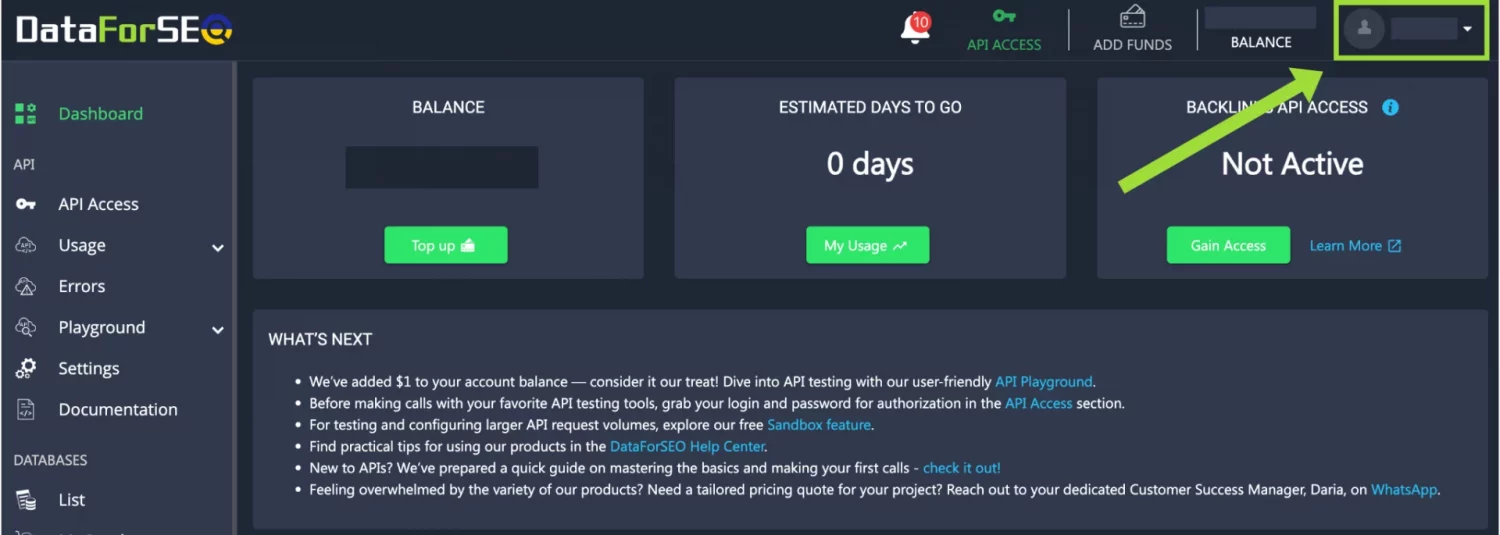
Delete-1

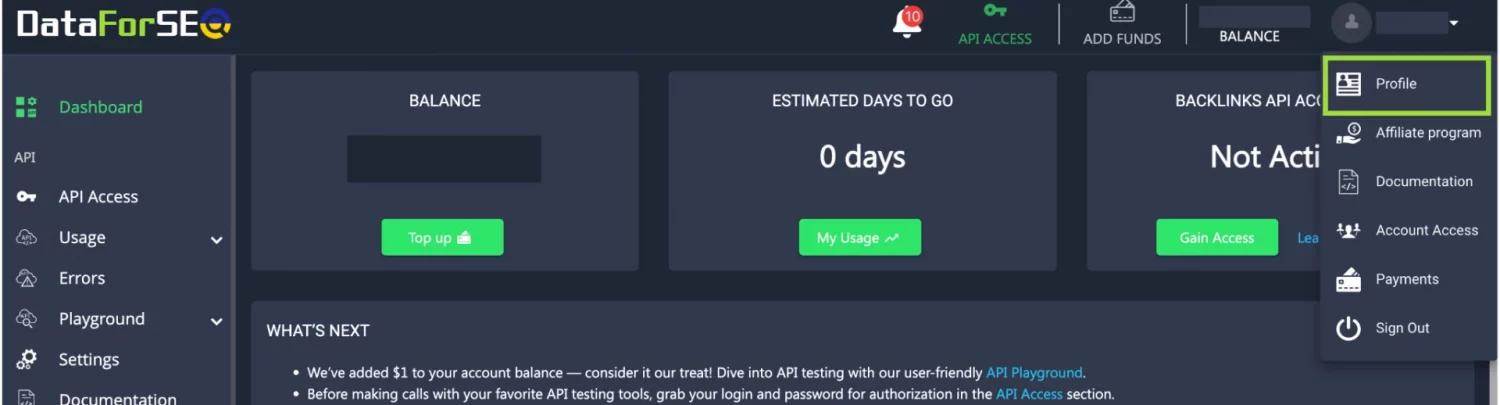
3 Go to Profile.

Delete 2

4 Click Delete Account and confirm your action.
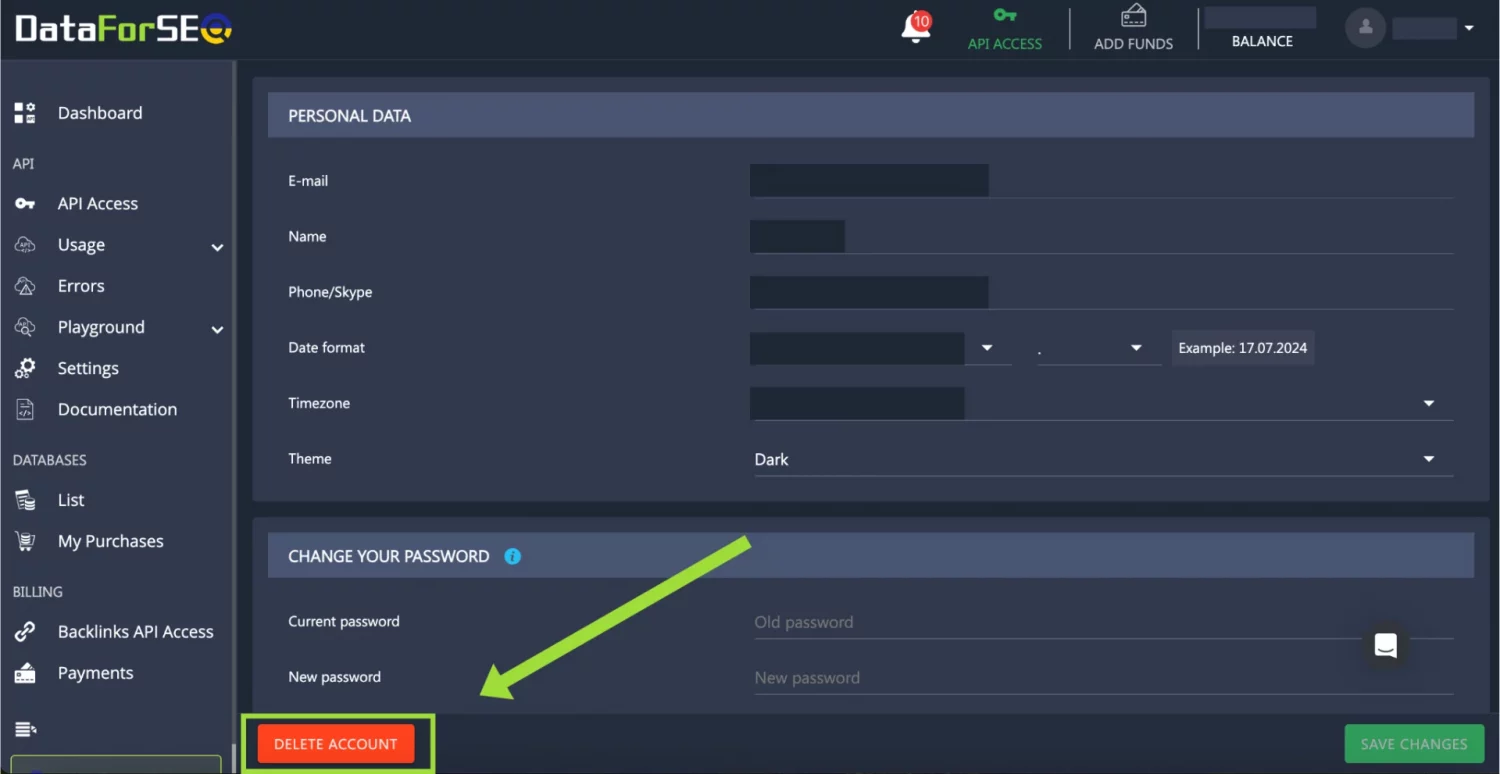
Delete-3

Note: you can request a refund of the first-time purchase of API credits within 30 days by contacting our customer support team. Refunds are not applicable to database purchases. Make sure to do so before deleting your account. You can learn more about our refund policy on the Terms of Service page.

If you encountered any issues while using our products or could not find what you were looking for, do not rush to delete your account. Instead, contact us first, and we will do our best to resolve your problem.

Was this article helpful?

More in Account & Billing

SERP API pricing & depth update FAQ Can I set a limit for my payments to DataForSEO? How to limit the number of duplicate tasks? What’s a webhook delay? How to set a delay for sending pingbacks and postbacks? How to whitelist IPs that can make API requests under my account?
logo
ukraine-heart Built with love in Ukraine

Vesivärava tn 50-201, Kesklinna linnaosa, Tallinn, Harju maakond, Republic of Estonia, 10152

63 Profesora Otamanovskoho St , Kharkiv, Ukraine, 61166

Email: [email protected]

  • LinkedIn
  • Facebook
  • X
  • YouTube

APIs

  • SERP API
  • Google Ads API
  • Backlinks API
  • OnPage API
  • DataForSEO Labs API
  • Reviews API
  • Pinterest API
  • App Data API
  • Business Data API
  • Amazon API
  • Google Shopping API
  • Domain Analytics API
  • Content Analysis API
  • AI Optimization API

Databases

  • Google Databases
  • Bing Databases
  • Amazon Database
  • App Store Database
  • Google Play Database
  • Domains Database
  • Backlink Database
  • Business Listings Database

Solutions

  • Backlink App
  • SEO Agency
  • SEO Software
  • Media
  • Ecommerce
  • Market Research
  • Digital Marketing
  • Marketing Tech
  • Scraping Services
  • AI Development

Knowledge Base

  • Blog
  • No-code Templates
  • White Papers
  • Help Center
  • Updates
  • Success Stories
  • DataForSEO Academy

Resources

  • About us
  • FAQ
  • Ukrainian Bravery
  • SERP Features
  • Top 1000 Sites
  • Google Sheets Connector
  • Make Integration
  • DataForSEO Trends Tool
  • Our data
  • Status Page
  • DataForSEO AI Assistant
  • Alternatives

Legal information

  • Privacy Policy
  • Terms of Services

Payment Methods:

Visa
MasterCard
Paypal