Quick overview
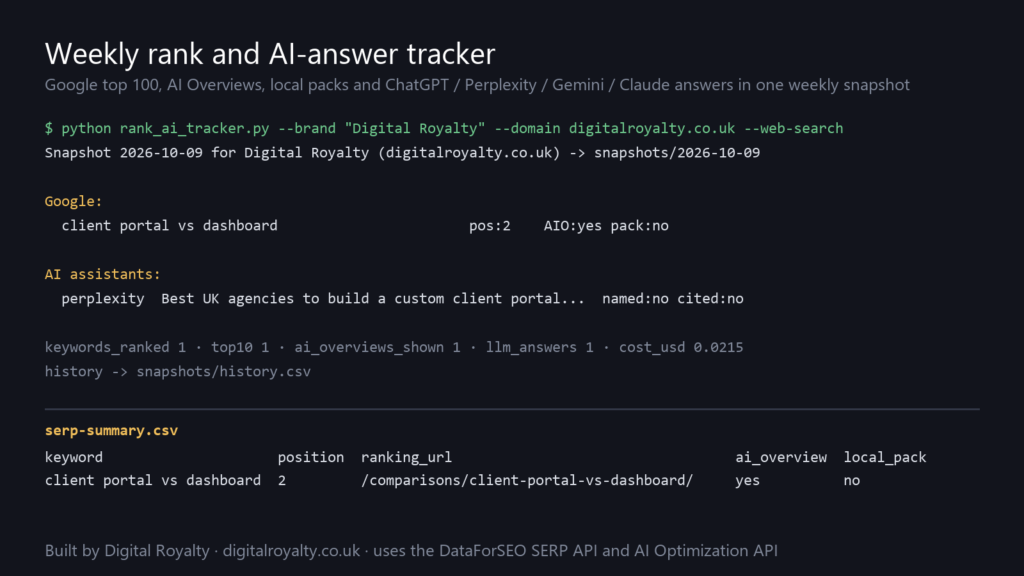
This script takes one snapshot a week of where a brand stands in Google and in AI assistants, and keeps every snapshot so you can see the trend. For each keyword it records the position in the live top 100, the page that ranks, the three domains above everyone else, and whether an AI Overview or a local pack is showing and whether the brand appears in it. For each customer question it asks ChatGPT, Perplexity, Gemini or Claude and records whether the answer names the brand and whether it cites one of the brand’s pages. Each run is a single command and writes a dated folder plus a line in a history file.
Who it’s built for
Agencies and in-house SEOs who report on rankings and are now being asked about AI search as well. It suits a small brand that wants to know if it shows up at all, and an agency running the same check across clients.
Workflow breakdown
- Put your keywords in keywords.txt and your customer questions in prompts.txt. Keep both stable from week to week: add to them, but don’t rename or delete lines, or the history stops lining up.
- Set DATAFORSEO_LOGIN and DATAFORSEO_PASSWORD in your environment.
- Run the script with your brand name and domain:
python rank_ai_tracker.py --brand "Acme Plumbing" --domain acmeplumbing.co.uk --web-search. Use--aliasfor other spellings,--platformsto choose assistants, and--location-codeand--languagefor markets outside the UK. - For each keyword, the script calls the SERP API (Google Organic, live, depth 100) and checks the result for your domain, AI Overview items and local pack items.
- For each question and assistant, it calls the AI Optimization API (LLM Responses, live) and checks the answer text for your brand and the cited URLs for your domain.
- It writes the dated folder, appends to history.csv and prints what the run cost.
- Schedule it weekly (cron, Task Scheduler or an n8n Execute Command node) and read the trend once a month. Single weeks move around a lot, so judge a change after it has held for three or four runs.
What you get
- serp-summary.csv with one row per keyword: position, ranking URL, top three domains, whether an AI Overview is shown and mentions you, whether a local pack is shown and includes you, and the other SERP features on the page.
- llm-summary.csv with one row per question per assistant: named or not, cited or not, which of your URLs were cited, and how many sources the answer used.
- Every raw API response saved as JSON, so a new question in three months can be answered from the files you already have.
- history.csv, which gains one line per run with the headline counts (keywords ranked, top 10, AI Overviews mentioning you, answers naming you, answers citing you, cost).
What you need to get started
- A DataForSEO account and your API login and password (from the dashboard, not the account password).
- Python 3.9 or later, with requests installed.
- A keyword list (keywords.txt) and a list of questions a customer would put to an assistant (prompts.txt). Both files ship with examples.
- The brand name, its domain, and any other spellings people use.