
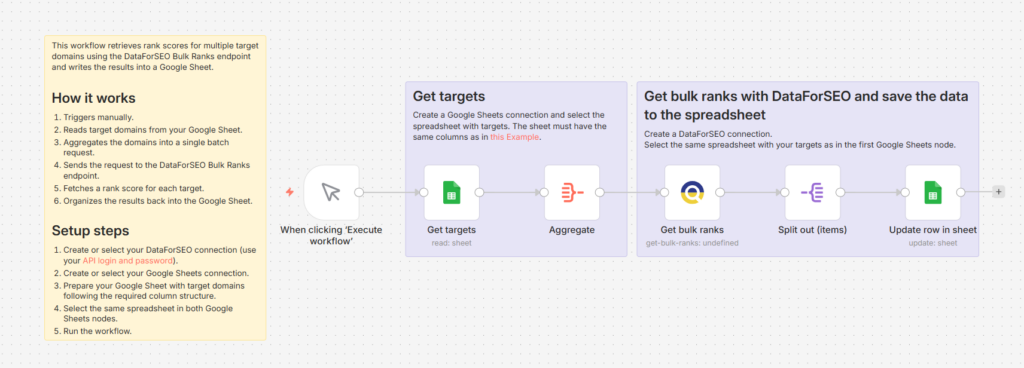
Quick overview
This workflow automates bulk domain rank analysis using n8n, Google Sheets, and the DataForSEO Bulk Ranks endpoint. Instead of manually checking domain authority one by one, you can process up to 1000 domains, subdomains, or pages in a single request and get all rank scores written directly back to your spreadsheet. This makes it easy to evaluate domain strength at scale without repetitive manual lookups.
Who it’s built for
This workflow is well-suited for SEO specialists, link-building teams, and digital agencies that need to quickly assess and compare domain authority across large lists of targets for outreach, audits, or reporting.
Workflow breakdown
- The workflow is triggered manually whenever you want to run a bulk rank check.
- It reads the list of target domains from a Google Sheet.
- All domains are combined into a single batch request and sent to the DataForSEO Bulk Ranks endpoint.
- It retrieves a rank score for each target domain. The score is based on the number of referring domains pointing to the site and follows the same node-ranking principle as Google’s PageRank algorithm.
- Rank values range from 0 to 1000 by default and reflect the most up-to-date data available at the time of the request.
- Once the data is received, the rank scores are mapped back to the corresponding rows in your Google Sheet for easy comparison and analysis.
What you get
You get an automated domain authority tracking system that generates rank scores for large domain lists in a single run. This helps you quickly understand relative domain strength and make faster SEO and link-building decisions without manual effort.
What you need to get started
- DataForSEO account and API credentials (your API login and password).
- Google Sheet containing your target domains.
- n8n instance with Google Sheets integration connected and configured for manual or scheduled execution.
