Quick overview
This workflow automates referring domain analysis for large domain lists using Make, Google Sheets, and the DataForSEO Bulk Referring Domains endpoint. Instead of manually checking referring domain counts for individual websites, you can process up to 1000 targets in a single request and have the results automatically organized in your spreadsheet. This helps you spend less time collecting data and more time analyzing link-building performance.
Who it’s built for
This workflow is designed for SEO teams, link-building specialists, and digital agencies that need to compare and evaluate referring domain profiles across multiple websites quickly and at scale.
Workflow breakdown
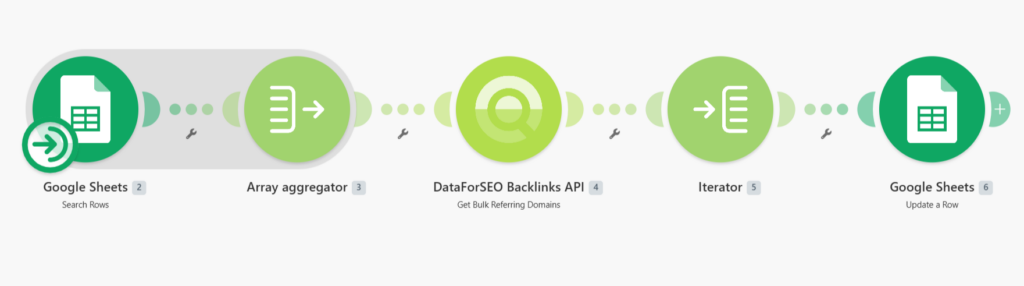
- The workflow is triggered manually whenever you want to run a bulk referring domain analysis.
- It reads the list of target domains from a Google Sheet.
- The scenario groups all domains into a single batch request and sends it to the DataForSEO Bulk Referring Domains endpoint.
- It retrieves referring domain data for each target, including total referring domains, nofollow referring domains, and main referring domain counts.
- Finally, the collected data is mapped back to the corresponding rows in Google Sheets for easy review and reporting.
What you get
You get an automated referring domain monitoring system that collects and organizes referring domain metrics for large domain lists in a single workflow run. The results provide a clear overview of domain authority and backlink diversity while removing the need for repetitive manual checks.
What you need to get started
- DataForSEO account and API credentials (your API login and password).
- Google Sheet containing your target domains.
- Make account with Google Sheets connected and a scenario configured for manual or scheduled execution.