
Quick overview
This workflow automates large-scale backlink profile analysis using Make, Google Sheets, and the DataForSEO Bulk Pages Summary endpoint. Instead of auditing domains one by one, it reads a list of target domains from Google Sheets, sends them as a single batch request, and writes backlink data directly back into your spreadsheet. This allows you to review backlink performance across hundreds of domains in a fast and organized way.
Who it’s built for
This workflow is designed for SEO specialists, link-building professionals, and digital marketing agencies that need to evaluate and compare backlink profiles across multiple domains quickly and efficiently.
Workflow breakdown
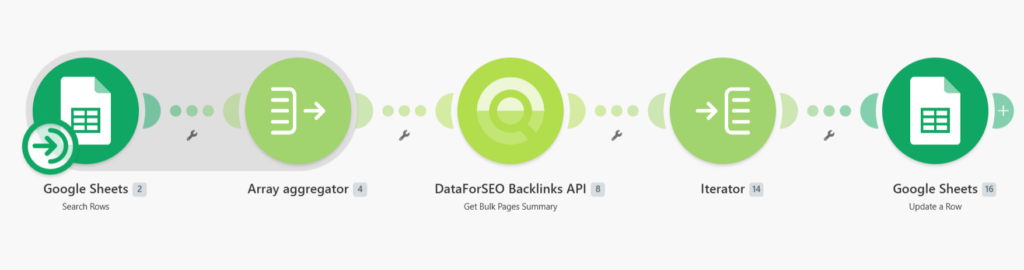
- The workflow is triggered manually whenever you want to run a backlink analysis.
- It reads the list of target domains from a Google Sheet.
- The scenario groups all domains into a single batch request and sends it to the DataForSEO Bulk Pages Summary endpoint.
- It retrieves backlink profile metrics for each domain, including backlink count, referring domains, domain rank, spam score, and additional SEO indicators.
- Finally, the collected data is mapped back to the corresponding rows in Google Sheets for easy analysis and reporting.
What you get
You get a scalable backlink analysis system that processes large domain lists in a single workflow run and automatically organizes the results in Google Sheets. This eliminates manual exports and repetitive audits, helping your team review backlink performance faster and maintain structured SEO data.
What you need to get started
- DataForSEO account and API credentials (your API login and password).
- Google Sheet containing the list of target domains.
- Make account with Google Sheets connected and a scenario configured for manual or scheduled execution.
