
Quick overview
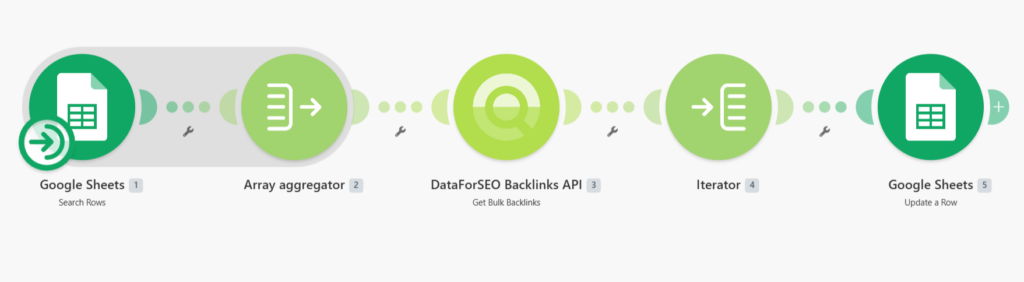
This workflow automates bulk backlink count analysis using Make, Google Sheets, and the DataForSEO Bulk Backlinks endpoint. Instead of checking backlink counts one domain at a time, you can analyze up to 1000 targets in a single request and have the results automatically mapped back to your spreadsheet. This provides a fast and scalable way to monitor backlink volume across large domain lists.
Who it’s built for
This workflow is designed for SEO specialists, link-building teams, and digital agencies that need quick backlink counts for competitive analysis, link evaluation, or recurring SEO reporting.
Workflow breakdown
- The workflow is triggered manually whenever you want to run a backlink count analysis.
- It reads the list of target domains from a Google Sheet.
- The scenario groups all domains into a single batch request and sends it to the DataForSEO Bulk Backlinks endpoint.
- It retrieves the total number of live backlinks for each target domain, including all active referring links regardless of attribute type.
- Finally, the backlink counts are mapped back to the corresponding rows in Google Sheets for easy analysis and reporting.
What you get
You get an automated backlink count monitoring system that processes large domain lists in seconds and stores the results directly in Google Sheets. This eliminates repetitive manual lookups and provides a clear overview of backlink volume across multiple websites.
What you need to get started
- DataForSEO account and API credentials (your API login and password).
- Google Sheet containing your target domains.
- Make account with Google Sheets connected and a scenario configured for manual or scheduled execution.
