Quick overview
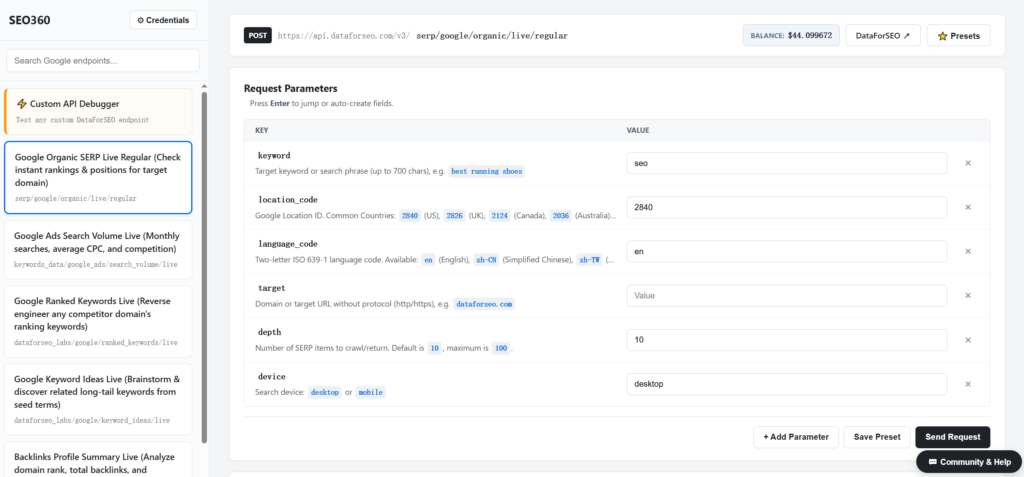
SEO360 is a Chrome extension for testing DataForSEO API endpoints without writing code. You choose an endpoint, fill in its parameters in a visual form, run the request and explore the response as a table or an expandable tree. Results can be exported to CSV or JSON, and each request can be turned into ready-to-use code. It works with live DataForSEO endpoints such as SERP and keyword data. SEO360 is a third-party extension built by an independent developer.
Who it’s built for
SEO specialists, marketers and site owners who want to work with DataForSEO data without writing JSON requests or scripts, and developers who want to inspect and debug endpoints quickly.
Workflow breakdown
- Install SEO360 from the Chrome Web Store and open it in Chrome.
- Enter your DataForSEO API login and password.
- Choose an endpoint, for example Google SERP or keyword data.
- Fill in the parameters in the visual form instead of writing JSON by hand.
- Run the request and review the response as a table or an expandable tree.
- Export the result as CSV or JSON, or generate the request as code (Python, Node.js or cURL).
- Save frequently used settings as a preset, and import or export presets to share them with your team.
What you get
- A visual parameter builder, so you don’t have to write JSON requests by hand.
- A table and tree view for navigating nested API responses.
- CSV and JSON export of the results.
- A code generator that converts a configured request into Python, Node.js or cURL.
- Presets that you can save, import and export.
What you need to get started
- Google Chrome.
- A DataForSEO account with an API login and password.