
Quick overview
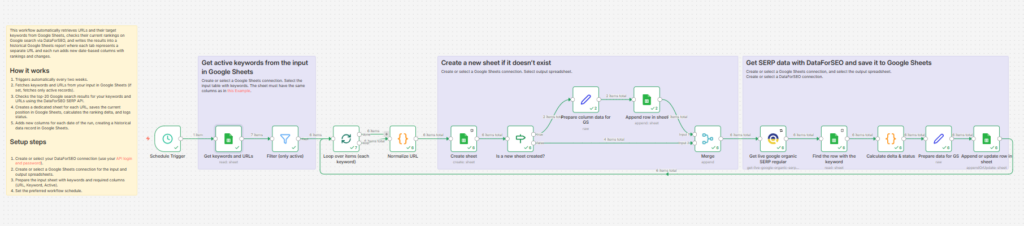
This workflow automates keyword rank tracking for specific URLs in Google search and stores the full history in Google Sheets. Using the DataForSEO SERP API, it regularly checks positions, detects ranking changes, and updates your report with fresh data.
Who it’s built for
This template is designed for SEO specialists, digital marketers, agencies, and website owners who want to monitor keyword performance at the URL level. It’s especially valuable for teams managing multiple landing pages and needing a structured, ongoing view of ranking trends over time.
Workflow breakdown
- The workflow runs on a schedule (every two weeks).
- It retrieves URLs and keywords from your Google Sheets input.
- Only active records are processed (if enabled).
- The DataForSEO SERP API is used to check rankings in the top-20 Google search results for your keywords and URLs.
- For each URL, a dedicated tab is created (if not already present) in the output spreadsheet.
- The workflow records keyword positions for the current run date and calculates ranking changes compared to the previous check.
- New columns are added for each run, building a historical ranking dataset.
What you get
You get an automated rank tracking system that continuously logs keyword positions for each URL into Google Sheets. The data is structured as a historical table where each tab represents a URL, rows list your keywords, and columns show rankings by date, along with position changes. This gives you a clear and organized way to monitor search performance and identify trends with zero manual effort.
What you need to get started
- DataForSEO account and API credentials (API login and password).
- A Google Sheets account connected to n8n for both input and output data.
- An n8n account with the DataForSEO node installed.
- A spreadsheet in Google Sheets with your URLs and keywords (should have columns: URL, Keyword, Active).
