Quick overview
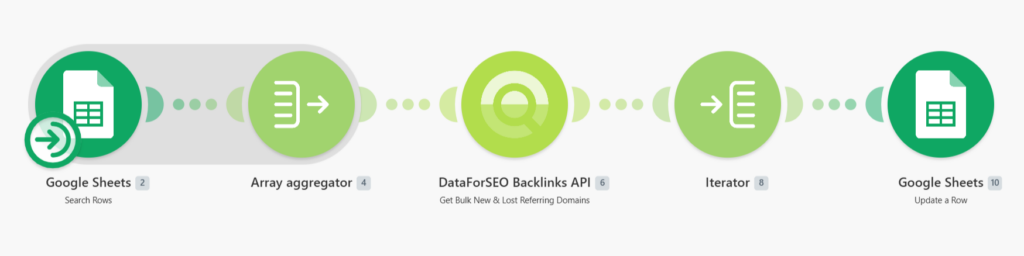
This workflow lets you monitor new and lost referring domains for up to 1000 target domains in a single run using Make, Google Sheets, and the DataForSEO Bulk New & Lost Referring Domains endpoint. Instead of analyzing each domain separately, you can process large lists at once and get a clear view of how referring domains change over time. All results are automatically written back into your spreadsheet for easy tracking and reporting.
Who it’s built for
This workflow is designed for SEO specialists, link-building teams, and digital agencies that need to continuously track referring domain growth and losses across multiple websites at scale.
Workflow breakdown
- The workflow is triggered manually whenever you want to run a referring domain analysis.
- It reads a list of target domains from a Google Sheet.
- All domains are grouped into a single batch request and sent to the DataForSEO Bulk New & Lost Referring Domains endpoint.
- The endpoint returns data on new and lost referring domains, including insights on main referring domains for each target.
- Once the data is retrieved, it is mapped back to the corresponding rows in your Google Sheet.
What you get
You get an automated system for tracking referring domain changes across large domain sets. It highlights both gains and losses of referring domains and stores everything neatly in Google Sheets, giving you a structured overview of link profile dynamics without manual work.
What you need to get started
- DataForSEO account and API credentials (your API login and password).
- Google Sheet containing your target domains.
- Make account with Google Sheets connected and a scenario configured for manual execution or scheduling.