
Whether conducting a GEO audit or building an AI visibility tool, the two questions remain the same: where to get the data and how to use it properly. Scraping AI responses and prompts manually is a heavy load even for large teams, and building a database may take weeks, if not months. The other issue is interpreting the data and building real solutions with it. Raw AI search data means little on its own until it’s tied to working tool features, innovative optimization workflows, and strategies that make sense in the fast-paced GEO industry.
Our team already has the answer to this growing demand for AI search data – the LLM Mentions API. Powered by a database of nearly 370 million real LLM prompts, this API is a game-changing data foundation. It provides live mention counts, top-mentioned brands lists, structured historical data, and more – enough to power any kind of GEO solution. But what are the best ways to put this data to use and get the most out of it?
This article covers exactly that. We’ll demonstrate five real-world use cases for the LLM Mentions API that show how to turn mention data into reports, product features your customers can act on, and solutions that streamline GEO efforts.
Contents:
1. Integrate a powerful LLM mention tracking solution into your tool
2. Create custom LLM skills for generating AI visibility reports
3. Find the pages AI trusts in your niche, and get your brand onto them
4. Explore the top brand competitors and categories mentioned by AI
5. Run an LLM-aware keyword research to optimize content
Conclusion
1 Integrate a powerful LLM mention tracking solution into your tool
Today, LLM-visibility tracking features are essential in modern SEO and GEO tools, not just optional. If your tool still doesn’t have one, you’re already falling behind your competitors. But how can you build a reliable AI visibility tracking software?
What distinguishes a good tool from a bad one is the data behind it and how that data is implemented into the tool’s features. The LLM Mentions API closes the data gap entirely. Its data capabilities are sufficient to fully power a working LLM tracking feature for your SEO or GEO tool.
That’s not an empty statement. Our WordPress developer, Dmytro, single-handedly built a functional LLM mentions module for his SEOInspector, powered exclusively by the LLM Mentions API. Here is what it looks like inside the tool.
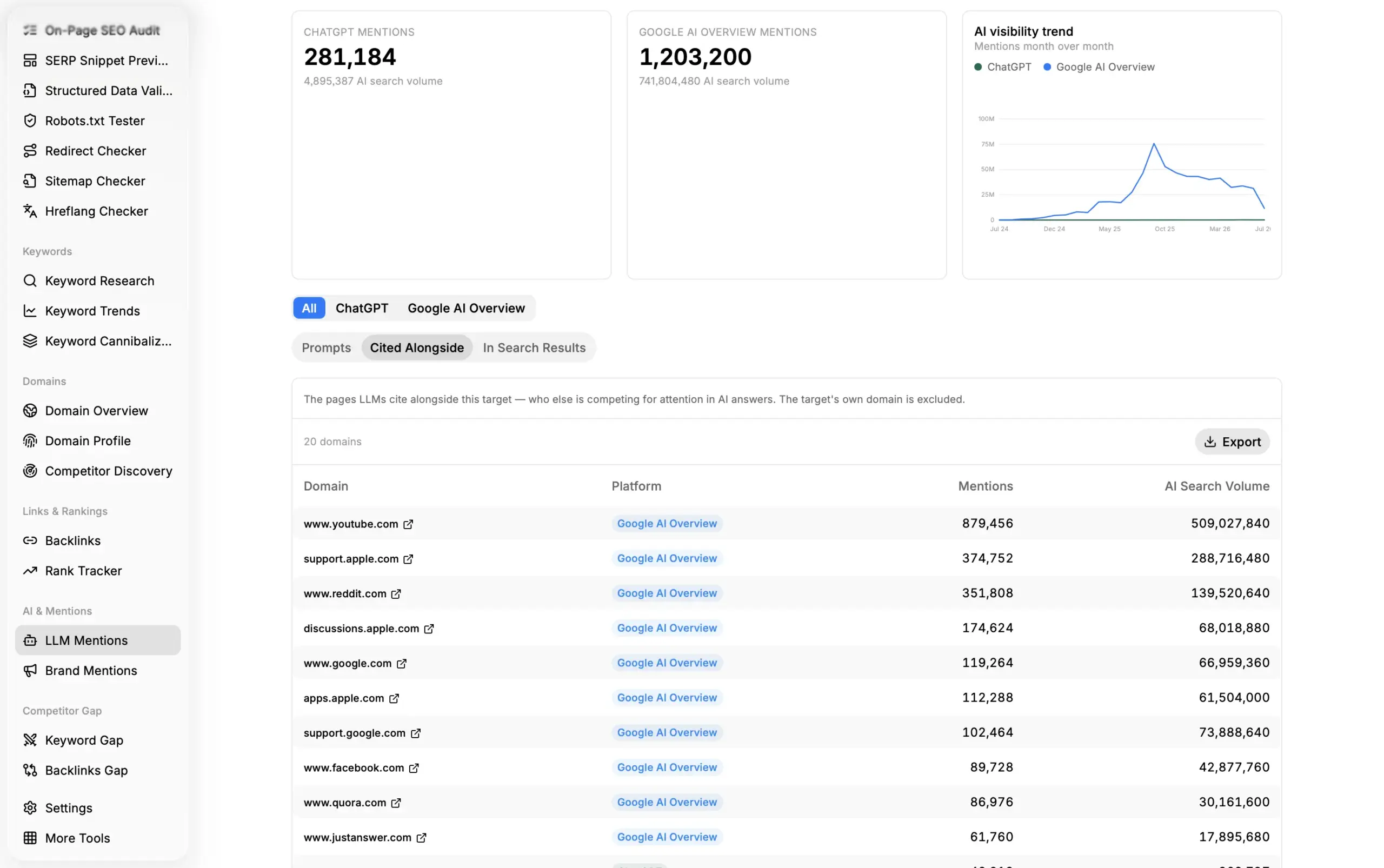
You specify the target domain or keyword, and the module returns a detailed breakdown of its popularity in Google AI Overviews and ChatGPT. The dashboard shows the total count of mentions by platform and historical changes in mentions count. Below, you can explore top prompts in which the target appears most often and see which sources and search results are mentioned alongside the target.
The following endpoints of the LLM Mentions API power these features:
- Historical supplies the month-by-month historical mentions data for a domain or keyword since August 2025. It powers the historical changes graph and allows a user to instantly see how their website was visible in AI search before – no need to wait for months for the data to be gathered.
- Target Metrics provides the total aggregated mention count for the target, as well as domains cited alongside the target or appearing in search results relevant to it. The metrics come already aggregated, so your system doesn’t need to calculate them separately from a raw mentions dataset.
- Search Mentions is what allows users to explore the actual prompts that contain the target or are relevant to it. It delivers granular data on individual prompts and responses, including target mentions, so you can see exactly in what context a brand is mentioned and what queries people use to discover it.
These endpoints are the backbone of the LLM Mentions module. Nevertheless, similar modules and features can be upgraded with data from additional endpoints, like LLM Scraper or LLM Mentions. With these endpoints, you can display real-time LLM response snapshots, allowing users to explore the AI search context more deeply. Additionally, you can integrate LLM Mentions Lite endpoints to obtain data quickly. The Lite endpoints return the same core data in a flattened format, without additional grouping by dimensions such as location or cited sources.
Dmytro’s design for an LLM mentions tracking feature is a straightforward but solid example of how the LLM Mentions API can be integrated. Read the full development story here – Dmytro has some great advice for those who are building similar tools.
2 Create custom LLM skills for generating AI visibility reports
Custom skills have recently become a major breakthrough for digital experts and teams who rely on AI-assisted workflows. Instead of manually providing an AI agent with context each time, the skill lets it execute the same procedure on every run. AI visibility reporting suits it well, as it is done regularly, follows a specific format, and relies on external data.
The combination of well-written skills and access to actual data enables LLMs to perform more complex analyses and generate reports that surpass those of many leading SEO tools. Our custom AI Visibility Report skill proves it completely. When installed, the skill lets you generate end-to-end AI visibility reports for target websites, formatted into neat PDFs ready to be sent to customers.
You answer a few simple questions about the customer, target keywords, main competitors, and report structure. After that, in a couple of minutes, you get a report similar to the one below.
The report has everything you need: an overall AI visibility score, a per-prompt breakdown, a citation landscape, and more. All metrics, scores, and data snapshots come directly from the DataForSEO API.
LLM Mentions API is one of the key data sources under the hood. The thing is, the report generation process follows two routes: aggregated metrics calculation and advanced live LLM probing. Response generation and live probing are the heavy parts of research, done by LLM Responses and LLM Scraper APIs. LLM Mentions API covers the aggregated metrics side, drawing on data that has already been collected and processed, providing broad mentions insights fast and at a low cost.
In particular, the following endpoints are used:
1. Target Metrics provides data for a fast, summarized AI Visibility snapshot that demonstrates key insights.
2. Multi-Target Metrics enables precise AI Visibility comparisons across multiple target domains and keywords. It supports competitor analysis with easy-to-understand, actionable summary data.
3. Top Mentioned Domains and Top Mentioned Pages fetch lists of domains and pages that are frequently mentioned alongside the customer-provided target keywords, thereby indicating a large AI share of voice.
That is how one data-backed skill can turn an LLM into a full-fledged GEO reporting assistant. What’s more interesting is that you can create similar skills by yourself easily. You can expand existing skills with new data endpoints or build one from scratch. Write a structured skill body, and describe the connection rules to DataForSEO APIs. The connection is easy to establish through our official MCP server.
This way, you’ll reimagine AI visibility reporting as something your assistant handles end-to-end, from the first API call to the finished document.
3 Find the pages AI trusts in your niche, and get your brand onto them
Making your brand visible for AI is not only about optimizing your own website and content. Growing your presence on other platforms, forums, and review websites is also vital for successful GEO. Mentions on trusted sites make an LLM more likely to cite your brand. But which sites are worth going after?
Manually searching for and evaluating such platforms is likely to take ages. Instead, you can compile a list of relevant platforms to promote your brand in a day or less using DataForSEO data. Using the LLM Mentions API and related endpoints, you can identify the top platforms for promotion with page-level precision, not just by domains, and get your content onto these platforms.
Here is the workflow and endpoints used:
1. Explore the top-mentioned pages in your niche. The LLM Mentions Top Mentioned Pages Lite endpoint is what you need for this step. You specify the target term for your market, define the search scope, and the endpoint returns a list of top pages frequently mentioned alongside the term, along with the total mention count for each page and AI search volume values.
Why use the Top Mentioned Pages Lite? The standard version of the endpoint returns a very granular breakdown of metrics for each page found, grouped by location, relevant LLM search results, and more. That’s a heavy JSON with a lot of data that may be hard to process. The Lite version provides only essential data for each page: its URL, mentions count, and AI search volume.
Here is an example request and response for Top Mentioned Pages Lite:
Request example:
[
  {
    "target": [
      {
        "keyword": "project management software",
        "search_filter": "include",
        "search_scope": [
          "question"
        ]
      }
    ],
    "platform": "google",
    "location_code": 2840,
    "language_code": "en",
    "links_scope": "sources",
    "limit": 10
  }
]
Response example:
{
  "version": "0.1.20260817",
  "status_code": 20000,
  "status_message": "Ok.",
  "time": "0.4217 sec.",
  "cost": 0.11,
  "tasks_count": 1,
  "tasks_error": 0,
  "tasks": [
    {
      "id": "09171419-1535-0659-0000-1fc2e30ddf6f",
      "status_code": 20000,
      "status_message": "Ok.",
      "time": "0.3521 sec.",
      "cost": 0.11,
      "result_count": 1,
      "path": [
        "v3",
        "ai_optimization",
        "llm_mentions",
        "top_mentioned_pages_lite",
        "live"
      ],
      "data": {
        "api": "ai_optimization",
        "function": "top_mentioned_pages_lite",
        "se_type": "llm_mentions",
        "target": [
          {
            "keyword": "project management software",
            "search_filter": "include",
            "search_scope": [
              "question"
            ]
          }
        ],
        "platform": "google",
        "location_code": 2840,
        "language_code": "en",
        "links_scope": "sources",
        "limit": 10
      },
      "result": [
        {
          "total_count": 4749,
          "items_count": 10,
          "items": [
            {
              "page": "https://zapier.com/blog/free-project-management-software/",
              "location": 2840,
              "language": "en",
              "platform": "google",
              "metrics": {
                "mentions": 179,
                "ai_search_volume": 440550
              }
            },
            {
              "page": "https://www.icagile.com/resources/honest-review-of-6-personal-project-management-tools-with-kanban-view",
              "location": 2840,
              "language": "en",
              "platform": "google",
              "metrics": {
                "mentions": 113,
                "ai_search_volume": 555820
              }
            },
            {
              "page": "https://www.wrike.com/project-management-guide/faq/what-are-project-management-tools/",
              "location": 2840,
              "language": "en",
              "platform": "google",
              "metrics": {
                "mentions": 88,
                "ai_search_volume": 208400
              }
            },
            {
              "page": "https://asana.com/resources/best-project-management-software",
              "location": 2840,
              "language": "en",
              "platform": "google",
              "metrics": {
                "mentions": 81,
                "ai_search_volume": 79790
              }
            },
            {
              "page": "https://www.paymoapp.com/blog/project-management-software/",
              "location": 2840,
              "language": "en",
              "platform": "google",
              "metrics": {
                "mentions": 79,
                "ai_search_volume": 320130
              }
            },
            {
              "page": "https://project-management.com/top-10-project-management-software/",
              "location": 2840,
              "language": "en",
              "platform": "google",
              "metrics": {
                "mentions": 63,
                "ai_search_volume": 12170
              }
            },
            {
              "page": "https://www.pcmag.com/picks/the-best-project-management-software",
              "location": 2840,
              "language": "en",
              "platform": "google",
              "metrics": {
                "mentions": 50,
                "ai_search_volume": 144800
              }
            },
            {
              "page": "https://www.reddit.com/r/projectmanagement/comments/1jwjw9s/what_project_management_tools_do_you_guys/",
              "location": 2840,
              "language": "en",
              "platform": "google",
              "metrics": {
                "mentions": 47,
                "ai_search_volume": 257900
              }
            },
            {
              "page": "https://www.projectmanager.com/",
              "location": 2840,
              "language": "en",
              "platform": "google",
              "metrics": {
                "mentions": 35,
                "ai_search_volume": 279740
              }
            },
            {
              "page": "https://www.reddit.com/r/projectmanagement/comments/1b0lfvi/what_is_the_best_free_project_management_tool/",
              "location": 2840,
              "language": "en",
              "platform": "google",
              "metrics": {
                "mentions": 35,
                "ai_search_volume": 186880
              }
            }
          ]
        }
      ]
    }
  ]
}
The API returned structured JSON containing the top URLs where “project management software” is mentioned. Now you can see exactly which forums and blog sections the AI cites most often.
2. Score the authority of found pages. After finding the relevant pages, you can move to authority scoring using the Backlinks API’s Bulk Ranks endpoint. It provides ranking scores for the pages based on the number of referring domains pointing to them. The ranking indicates whether the placement on the page is winnable, allowing you and your PR team to prioritize them.
Here is an example call to this endpoint. You can specify up to 1000 domains, subdomains, or pages in the request:
Request example:
[
  {
    "targets": [
      "https://zapier.com/blog/free-project-management-software/",
      "https://www.icagile.com/resources/honest-review-of-6-personal-project-management-tools-with-kanban-view",
      "https://www.wrike.com/project-management-guide/faq/what-are-project-management-tools/",
      "https://asana.com/resources/best-project-management-software",
      "https://www.paymoapp.com/blog/project-management-software/",
      "https://project-management.com/top-10-project-management-software/",
      "https://www.pcmag.com/picks/the-best-project-management-software",
      "https://www.reddit.com/r/projectmanagement/comments/1jwjw9s/what_project_management_tools_do_you_guys/",
      "https://www.projectmanager.com/",
      "https://www.reddit.com/r/projectmanagement/comments/1b0lfvi/what_is_the_best_free_project_management_tool/"
    ]
  }
]
Response example:
{
  "version": "0.1.20260817",
  "status_code": 20000,
  "status_message": "Ok.",
  "time": "0.3184 sec.",
  "cost": 0.0201,
  "tasks_count": 1,
  "tasks_error": 0,
  "tasks": [
    {
      "id": "09171423-1535-0347-0000-54400cfdc397",
      "status_code": 20000,
      "status_message": "Ok.",
      "time": "0.2503 sec.",
      "cost": 0.0201,
      "result_count": 1,
      "path": [
        "v3",
        "backlinks",
        "bulk_ranks",
        "live"
      ],
      "data": {
        "api": "backlinks",
        "function": "bulk_ranks",
        "targets": [
          "https://zapier.com/blog/free-project-management-software/",
          "https://www.icagile.com/resources/honest-review-of-6-personal-project-management-tools-with-kanban-view",
          "https://www.wrike.com/project-management-guide/faq/what-are-project-management-tools/",
          "https://asana.com/resources/best-project-management-software",
          "https://www.paymoapp.com/blog/project-management-software/",
          "https://project-management.com/top-10-project-management-software/",
          "https://www.pcmag.com/picks/the-best-project-management-software",
          "https://www.reddit.com/r/projectmanagement/comments/1jwjw9s/what_project_management_tools_do_you_guys/",
          "https://www.projectmanager.com/",
          "https://www.reddit.com/r/projectmanagement/comments/1b0lfvi/what_is_the_best_free_project_management_tool/"
        ]
      },
      "result": [
        {
          "items_count": 10,
          "items": [
            {
              "target": "https://zapier.com/blog/free-project-management-software/",
              "rank": 207
            },
            {
              "target": "https://www.icagile.com/resources/honest-review-of-6-personal-project-management-tools-with-kanban-view",
              "rank": 125
            },
            {
              "target": "https://www.wrike.com/project-management-guide/faq/what-are-project-management-tools/",
              "rank": 222
            },
            {
              "target": "https://asana.com/resources/best-project-management-software",
              "rank": 130
            },
            {
              "target": "https://www.paymoapp.com/blog/project-management-software/",
              "rank": 145
            },
            {
              "target": "https://project-management.com/top-10-project-management-software/",
              "rank": 201
            },
            {
              "target": "https://www.pcmag.com/picks/the-best-project-management-software",
              "rank": 213
            },
            {
              "target": "https://www.reddit.com/r/projectmanagement/comments/1jwjw9s/what_project_management_tools_do_you_guys/",
              "rank": 69
            },
            {
              "target": "https://www.projectmanager.com/",
              "rank": 314
            },
            {
              "target": "https://www.reddit.com/r/projectmanagement/comments/1b0lfvi/what_is_the_best_free_project_management_tool/",
              "rank": 74
            }
          ]
        }
      ]
    }
  ]
}
The response returns a list of specified URLs with calculated rank scores. This way, you can quickly assess the authority of every page.
3. Track AI visibility changes after content placement. Finally, when you publish guest posts, participate in discussions, or secure your presence in other ways, you will need to track changes in AI visibility over time. The Timeseries Delta and Timeseries New & Lost endpoints are the perfect tools for that. Timeseries Delta returns the period-over-period change in mentions and AI search volume for the target. Timeseries New & Lost, on the other hand, displays which mentions are new in each period and which are lost. By tracking your brand name, domain, or specific pages with these endpoints, you can assess the effectiveness of the new content campaign over time.
By using this workflow, you can streamline the key processes of off-page GEO. First, you remove manual discovery of target pages and provide your marketing team with a list of prospective sites for content placement. Second, you make off-page campaign reporting data-driven by tracking AI visibility changes since day one.
4 Explore the top brand competitors and categories mentioned by AI
Finding your key SEO competitors is straightforward: there are many well-known methods for competitor research, and you just need to choose the one that fits you best. In GEO, conducting competitor research is more complicated because each model cites sources differently, and AI responses aren’t as consistent as those in most SERP results. That’s why the competitor list you already work with in SEO may have little in common with the brands LLMs actually cited in their answers.
Instead of guessing which brands share the answer space with you, you can pull that list directly. The LLM mentions API has endpoints that enable you to do it effortlessly:
1. Fetch a list of top mentioned brands in your market. The first and key endpoint, Top Mentioned Brands, returns the brands that models name most often for your target term, ranked by mention count, so the competitive picture comes from the responses themselves rather than from assumptions. Additionally, you can explore which other cited sources and LLM search results are associated with the brands, as well as the total AI search volume relevant to them.
2. Explore the categories the brand is associated with. Top Mentioned Brand Categories endpoint adds another layer of analysis, showing which entity types the target term is most often associated with. It can help you to understand the two things. First, do the target queries that you optimize for fall into the same category as your business in LLM search? Some queries you target may not match the business entities the LLM associates with them. Second, you can explore previously unknown brand categories that are favored by an LLM, allowing you to expand the scope of competitor research and content optimization.
Together, the two endpoints reveal not only who competes with you inside AI answers, but also how the market itself is framed there, which is often the more valuable finding. Both endpoints also offer the Lite version, so you can fetch only the core insights rather than heavy dataset snapshots. Moreover, you can include or exclude specific brands and brand categories to narrow the research scope or track changes in the popularity of specific brands.
3. Benchmark your brand against competitors. When you prepare the list of brand competitors, it’s time to benchmark yourself against them to see how realistic it is for you to compete with them in AI searches. The Multi-Target Metrics endpoint deals with it perfectly. You can pass domain names of your and your competitors’ websites, or specific keywords associated with brands, and compare their popularity level against various metrics. This endpoint features an entity-based task-setting process that allows you to precisely compare multiple target domains or keywords. Besides, it features advanced comparison parameters that help narrow down results or run different comparison scenarios. Read more about working with this endpoint in our Help Center.
Overall, this workflow is a solid solution for expanding your GEO competitor research. Combine it with live probing using LLM Responses and LLM Scraper APIs to get a full context of how your competitors perform in AI searches.
5 Run an LLM-aware keyword research to optimize content
If you plan to optimize your content for LLM search channels alongside organic search, the traditional approach to keyword research isn’t practical. There is no publicly available data on keyword popularity from major LLM platforms, and the search queries people use in AI may differ significantly from those in web search. Thus, a comprehensive keyword research should combine traditional techniques with the LLM-oriented approaches.
First, you need to explore the prompts in your niche that people use in LLM searches and assess their popularity. The prompts may vary significantly in search volume compared to organic search, so applying organic search volume to them isn’t reliable.
Second, LLMs can break a single user prompt into multiple sub-prompts to search for additional sources and context for generating a response. That behavior is called a query fan-out and is an essential part of the web search process in most popular LLMs. These queries are hidden from a user, but strongly influence how LLMs discover and cite sources for responses. Our research of 100,000 real ChatGPT prompts demonstrated that 47.5% of user prompts triggered a query fan-out in ChatGPT, so the impact of query fan-out can’t be overstated. This means that keyword research should also target LLM-generated queries, which may never be shown to a real user.
Finally, you must assess the popularity of newly discovered queries before adding them to your target keyword list, and compare them with organic search queries to estimate their potential. For such deep keyword analysis, DataForSEO has the right solution, where the LLM Mentions API plays one of the key roles:
1. The Search Mentions endpoint fetches granular data from our LLM Mentions dataset. It will help you to pull exact prompts people use in AI search, as well as fan-out queries associated with the initial user’s queries. Additionally, it pulls AI search volume for the user queries found, as well as monthly searches. This endpoint does most of the work in this workflow, providing exact target user queries and fan-out queries to form a keyword list.
2. The Keyword AI Search Volume adds another data layer for found keywords and fan-out queries. It enriches them with AI search volume – our proprietary search volume metric that shows how popular queries are in AI searches. This metric can help you prioritize keywords by their potential, alongside the mentions count metric.
3. The Google Ads Search Volume concludes the keyword research by exploring the search volume of new keywords in organic search. It will help to sort keywords further by relevance to your goals and potential. In addition, it’ll supply data on other keyword metrics in organic search, such as competition, CPC, and monthly searches.
By following this advanced workflow, you will quickly find relevant keywords for AI search optimization and traditional SEO. With our official DataForSEO MCP server, you can run this keyword analysis without writing a single line of code straight from your AI assistant. Connect the MCP server following this quickstart guide, and prompt the model to run an LLM-oriented keyword research for specific queries. The model will do the rest.
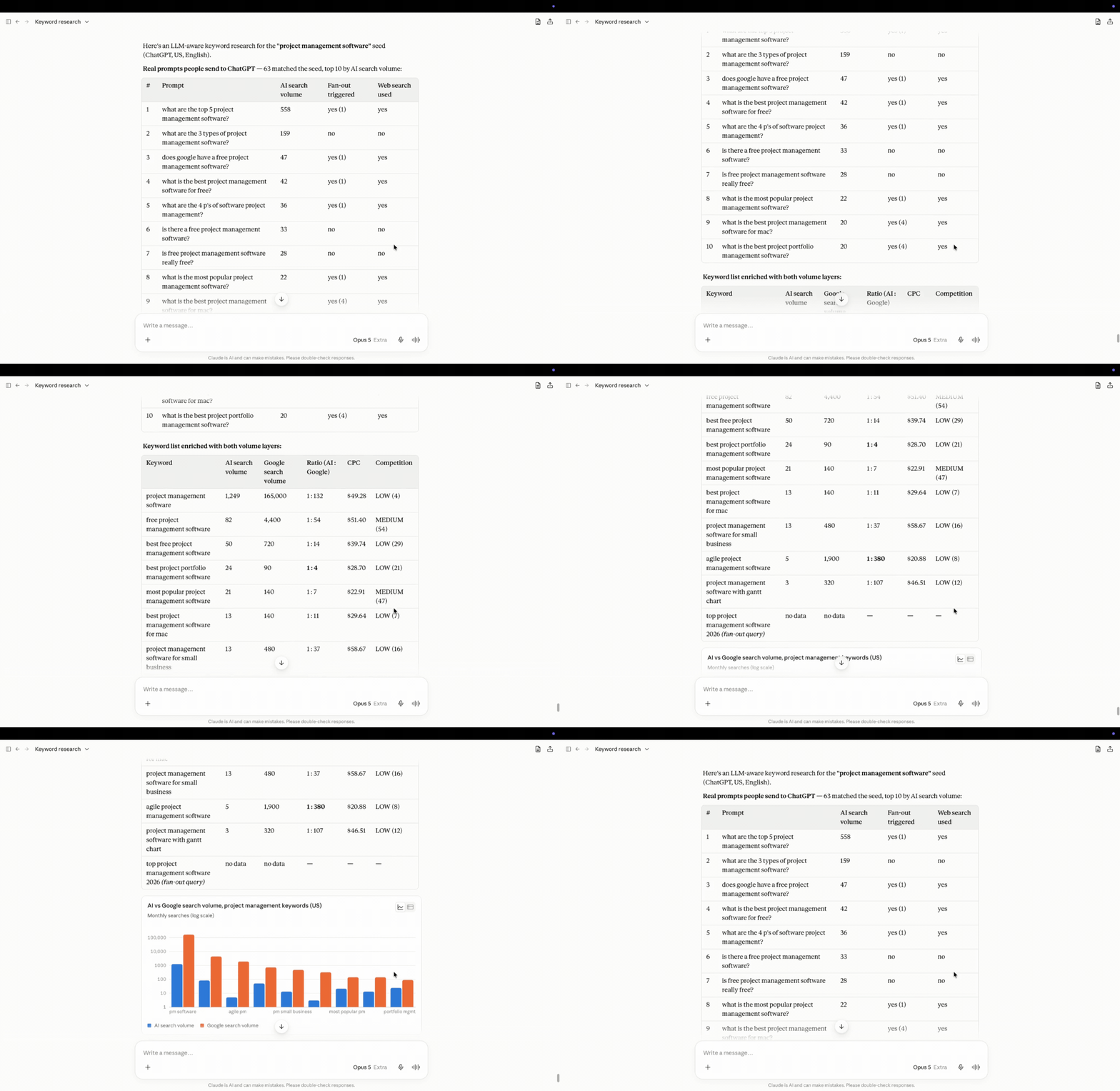
Here is the result. Claude used the MCP connection to call the DataForSEO API endpoints, fetched relevant queries, and assessed AI and Google search volumes. After that, it organized the data into readable tables and charts, ready to act on.
With the help of DataForSEO APIs, you can easily run complex LLM-aware keyword analysis in minutes, against real data.
Conclusion
The LLM Mentions API, paired with other advanced DataForSEO APIs, closes almost every data gap in modern GEO. This API is a versatile data solution for a wide range of GEO use cases, even dramatically different ones. In particular, you can achieve the following:
- Build a working LLM mention tracking solution.
- Design a custom LLM skill to generate structured AI visibility reports.
- Optimize your off-page GEO by finding and publishing on channels favored by AI.
- Find brand competitors fighting for the AI share of voice in your market.
- Run a keyword research that covers SEO and GEO optimization strategies.
That’s only a short list of possible use cases for the LLM Mentions API. Try for free and build your own working GEO solution with the best data. New to DataForSEO? Learn the basics in 30 minutes at our DataForSEO Academy and earn extra credits for using the APIs.