
Most SEO platforms ask you to subscribe to a monthly plan to access advanced features and tracking. But you pay for all the features, even when you don’t use them in your project. Dmytro Lobov, our WordPress developer, compared a few of those plans to how often he would use them. Like many other SEO enthusiasts, he decided he would rather build his own SEO tool.
What he built is SEOInspector, a macOS app that runs multiple advanced SEO checks straight from your device. Seven of its modules run locally and don’t fetch external data. The rest call DataForSEO APIs for the checks that require live insights. Everything the app returns is saved locally on your device, so a check you run today still has last month’s version to measure against. The SEOInspector is Dmytro’s personal project, built during his own time, rather than a DataForSEO product.
This article walks you through the process Dmytro developed SEOInspector and the key decisions behind its feature set. We’ll explore the tool’s concept, the limitations of working with AI app builders, and how the app is designed to keep API costs under control. Plus, we’ll share Dmytro’s advice for developers who consider building their own SEO tools the same way.
Contents:
Why build your own SEO tool instead of subscribing to one
Two earlier versions: Python scripts, then a Chrome extension
Choosing the development platform: why Glaze
Splitting local checks from data-backed checks
The AI-assisted development workflow
How DataForSEO APIs power SEOInspector
Keeping API costs down: five design decisions
Advice for developers building API-based tools
Wrap up
Why build your own SEO tool instead of subscribing to one
Dmytro has been working with WordPress since 2016. At DataForSEO, he is responsible for maintaining our main website and documentation website, and improving them with custom-built plugins and features. Outside of work, he runs several side projects of his own, and those need the same attention to stay visible in search.
For Dmytro, SEO has always been part of the job with WordPress. Every project he has worked on has raised the same optimization issues. He needed to check the website’s health and structure, changes in the backlink profile, which keywords drive traffic, and more. None of this is answered once – you need to run the same checks periodically to understand what has changed.
Popular SEO tools and optimization suites can handle many types of tracking, so the tool capabilities weren’t the issue for Dmytro. The billing was. A subscription costs the same each month regardless of how many audits are run. Months with few or no audits are common when the website is yours, and nothing much has changed. Additionally, nearly every platform requires adding some project data to the account, which wasn’t a reliable option. He wanted to keep the sensitive project data private and under control.
Out of that came four requirements for the custom tool, and they turned out to decide most of what followed:
- The tool runs on a user’s machine. Not in a browser or someone else’s server.
- It costs nothing when idle. The tool doesn’t have subscriptions, and you pay only for the checks you perform.
- The tool keeps its own history. You can always compare new audits against previous ones.
- It stores nothing the user doesn’t control. The data is not public and stays on the device.
That was the initial concept behind SEOInspector, which evolved from a set of scripts into a complete, public SEO app for macOS. Let’s take a closer look at Dmytro’s previous attempts and how they determined the tool’s final shape.
Two earlier versions: Python scripts, then a Chrome extension
The SEO inspector was Dmytro’s third attempt at creating an SEO tool. The first version was a set of Python scripts that worked, but they didn’t maintain memory between sessions.
The second version was a Chrome extension. It allowed users to open and run the checks while staying on a target page in the browser. However, the browser extension model limited the number of available tools, the amount of data stored, as well as how many results could be displayed to a user. That set strict boundaries to the tool’s usability and capabilities.
The desktop version removed the browser sandbox and provided Dmytro with more space: a robust storage layer, an intuitive interface, and room for tools that couldn’t fit into an extension. The interface of the current On-Page SEO Audit module in SEOInspector shows why that mattered.
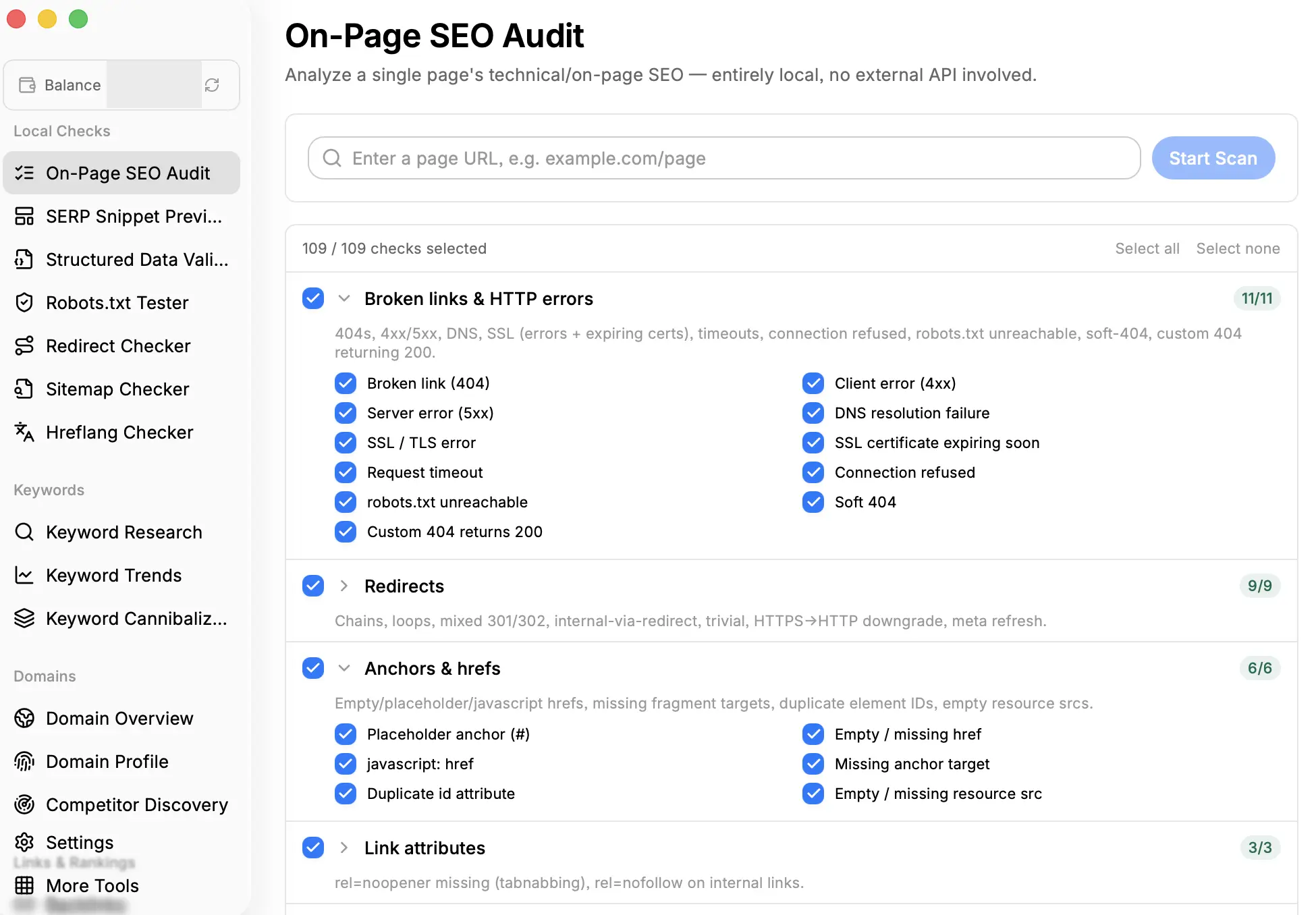
The module runs 109 individual checks, grouped into 13 expandable categories. Every category and every check has its own toggle, with “Select all” and “Select none” buttons on top. You can switch checks on and off one by one, and the results of every audit are stored so you can revisit them later.
The path from a set of scripts to the SEOInspector app is logical, but it doesn’t mean the previous versions were failures. The Python scripts and Chrome extension helped Dmytro achieve his specific goals, and the changes came from the need to expand the tool’s capabilities and to save the results of each analysis.
Now, let’s move on to how Dmytro actually built the SEOInspector app, starting from the development platform choice.
Choosing the development platform: why Glaze
With the app’s format decided, Dmytro started looking for a development platform to build it on. Primarily, he wanted to build the app around his needs first, and as a Mac user, he aimed to develop it for macOS only. Dmytro also considered building SEOInspector with AI assistance to speed up the development and its public release. Eventually, he went with Glaze, an AI desktop app builder for macOS.
The key reasons why Dmytro chose it are the following:
- Native macOS output built through AI. Glaze allowed him to build a native macOS app that runs directly on a user’s machine, rather than something hosted elsewhere. For a tool whose whole point is keeping data local, that alignment was the deciding factor.
- Designed around AI-assisted work. Dmytro was going to build with AI either way, so a platform organized around AI-assisted development saved him from having to assemble that setup from scratch.
- A ready component library. Prebuilt React and Tailwind components allowed the interface to skip the initial design from scratch.
Dmytro points out one thing about the platform: AI is essential for all tasks here. This isn’t a typical IDE workflow, and users who are uncomfortable managing an agent may encounter difficulties early on.
Glaze returned a basic yet incomplete application that included the shell, navigation, and component structure, but lacked full functionality. The AI provides you with a base for a complex application, and then you finish the job yourself. That is where his firmest rule in this project comes from: write the detailed implementation plan for AI before you ask it to build a solution. Vague requests return partial results, and the plan sets the maximum the agent can deliver.
Splitting local checks from data-backed checks
Now, let’s explain the decision that shaped the app more than any other and was made by Dmytro and not by an AI agent. Some SEO checks need live search data, and some do not, so he split the feature set along that line before building any of it.
Seven modules of SEOInspector run entirely locally on the user’s device, requiring no API key, user account, or payments: On-Page SEO Audit, SERP Snippet Preview, Structured Data Validator, Robots.txt Tester, Redirect Checker, Sitemap Checker, and Hreflang Checker. All of these tools operate on data that the app can retrieve and analyze independently.
The On-Page SEO Audit tool is the clearest example of that logic. It performs checks on a single URL, analyzing whatever the page returns: 4xx and 5xx responses, expiring certificates, redirect loops, canonical tag inconsistencies, and so on. With the DataForSEO OnPage API you can perform a similar audit, but it is the right call when you need to crawl a full site. For a single-page analysis, the SEOInspector has everything you need.
The other twelve modules run on live data from DataForSEO APIs: Keyword Research, Keyword Trends, Keyword Cannibalization, Domain Overview, Domain Profile, Competitor Discovery, Backlinks, Rank Tracker, LLM Mentions and Brand Mentions, plus Keyword Gap and Backlinks Gap. These advanced tools require actual insights, and the DataForSEO API is the sole data foundation that fulfills all needs in one place.
The benefits from that split show up in a few places. First, the app is useful right after installation, which matters when someone downloads it from the store on a whim. Second, every feature that is expected to work locally without external data functions properly and delivers correct results. Finally, the user is not overwhelmed by paid features – the 12 modules powered by the DataForSEO APIs are enough to conduct a detailed analysis. On top of that, each module can be used independently and is billed separately.
The AI-assisted development workflow
The vast majority of the code in SEOInspector was written by AI under Dmytro’s supervision. Overall, the loop he settled into has five following steps:
1. Scaffold the app in Glaze. Generate the base application: shell, navigation, and key components.
2. Write the implementation plan and create modules. Create a detailed implementation plan before prompting AI to generate any module. Clearly describe what it has to do and what the result should be.
3. Move into a real IDE. With the base application generated, Dmytro opened the project in PhpStorm and worked on modules and builds directly.
4. Extend the app with coding assistants. Dmytro used Claude, OpenCode, and the Context7 plugin to implement most of the app’s features and to integrate with the DataForSEO API. Claude with Context7 did most of the implementation work.
5. Review, verify, and test the app. The generated output is a draft, not a result. Every key aspect of an AI-generated app must be reviewed and tested.
Let’s take a closer look at the key aspects of this development workflow. In particular, step four deserves its own separate paragraph, because it highlights the API integration process. Dmytro integrated the DataForSEO API with the help of Claude and the OpenCode AI code assistant, but he faced the problem of providing models with context about the DataForSEO API library. The solution was Context7 – a universal tool with MCP capabilities that can pull fresh documentation from popular libraries into AI coding assistants. Dmytro pointed it at our documentation while the integration was being written. This allowed models to write integration code against the actual endpoint and parameter surface instead of inventing their own approaches, which might have been unreliable.
The other key aspect is the approach to code organization. Every module of the app, together with the API requests it sends, is kept in a separate file instead of being combined into shared code that is hard to read. Dmytro follows this rule for the sake of readability: opening the project several months later, he can immediately see which file is responsible for which part of the app and where exactly each API call is made. This structure also makes maintenance and reviews easier, since a change to one module or one request does not require going through the entire project.
The app testing was completely manual, with no automated suites. Dmytro tested the app modules and SEO checks individually to confirm that each behaved as intended. Testing took most of the development time, but that was the cost of writing most of the application with AI. Generated code may look right at first glance, but serious errors may emerge during testing, and its output may not match the expected behavior.
In summary, the use of AI significantly boosted the development process, but, as it was mentioned before, the AI must always be directed with clear instructions and used wisely, as models can make a lot of things wrong. The other issue that Dmytro encountered is token usage management. Using AI costs money – poor prompting and vague instructions result in increased spend, as you need to burn additional tokens to make the model rework its output.
How DataForSEO APIs power SEOInspector
Another essential part of SEOInspector development to cover is how it works with DataForSEO APIs and which APIs power the tool’s modules. SEOInspector communicates with the DataForSEO API directly, without any server standing between the app and our endpoints. The user’s API credentials are stored on their own device in encrypted form and are never synced anywhere, so every request the app sends is sent from the user’s machine.
This is a deliberate architectural decision rather than a gap in the tool’s development. The direct API connection removes an entire tier from the system, as there is no need to maintain hosting, a proxy server, or request logging. Besides, a user pays only the DataForSEO rates without any additional charges, since there is no intermediate service that could apply them. In exchange, Dmytro takes on the responsibility for handling credentials on the client side, which is the reason the API key is encrypted locally and never leaves the device.
Now, let’s take a look at which DataForSEO APIs Dmytro plugged into the live data tools and how the data is saved after each run.
Here is a table that shows how the data-backed modules correspond to the APIs behind them.
| Module | Data behind it |
| Keyword Research | DataForSEO Labs API, Keywords Data API, AI Keyword Data API: difficulty, volume, CPC, competition, intent, suggestions, clickstream search volume, AI search volume |
| Keyword Trends | DataForSEO Trends API: relative popularity of a keyword over a selected time range |
| Keyword Cannibalization | DataForSEO Labs API (Page Intersection endpoint) keywords that several pages of the same domain rank for within the same SERP, position, search volume, and estimated traffic for pages |
| Domain Overview, Keyword Gap, Competitor Discovery | DataForSEO Labs API: domain-level visibility metrics, ranked keywords, keyword intersections, keyword intersections between domains, and competing domains ranked by the number of shared keywords |
| Domain Profile | Domain Analytics API: WHOIS records, registration and expiration dates, technology stack of a domain |
| Backlinks, Backlinks Gap | Backlinks API: summary metrics, referring domains, anchors, new and lost links |
| Rank Tracker | SERP API: live positions for a whole keyword list, sent as one batched request |
| LLM Mentions | LLM Mentions API: mentions and citations in ChatGPT and Google’s AI Overview, with AI search volume |
| Brand Mentions | Content Analysis API: citations of the brand name across web content, with sentiment analysis, rating distribution |
As you can see, the variety of DataForSEO APIs used is wide, and the data delivered enables each module to analyze and demonstrate different insights to a user.
What’s more interesting is that you can look at the data from previous module runs anytime, with no extra spending. Every response the app receives is written to IndexedDB and stored on the user’s device. This is what turns separate checks into a timeline, as the user can open the data collected a month ago and compare it with the current result of the same check. Likewise, you can download the data from each run in CSV format for further analysis with other tools or interpret it with AI. The direct API connection, simple and secure authorization, variety of data it supports, and local storage make SEOInspector a more flexible and convenient alternative to the most popular SEO Tools.
At the same time, Dmytro admits the drawback of the local-first approach: data stored only on the local device may be lost, since the app provides neither backup nor synchronization, and nothing can be recovered beyond what has already been exported.
Keeping API costs down: five design decisions
During the development, Dmytro paid special attention to features that reduce API spending. The motivation was clear: he wanted to use this tool for his own pet projects, and he would be the one paying for each API call. Thus, he came up with five design decisions that made the app cost-effective for himself and his users straight from launch:
1. Cache every search and pay for it once. Every search is cached locally, so running the same request again does not produce a second charge. If fresh data is needed, users can tap the Search again button to fetch new results. Browsing stored results costs nothing, whereas spending money always requires a deliberate action by the user.
2. Reuse the data across modules. A domain that has already been analyzed in the Backlinks module feeds the Backlinks Gap analysis instead of triggering a new request. Wherever the data structure allows,
3. Set the cost-adding options to off by default. Specific modules, such as Keyword Research, are based on the DataForSEO endpoints with optional parameters that increase the cost of the request, if enabled. Dmytro made such parameters optional and set them off by default.
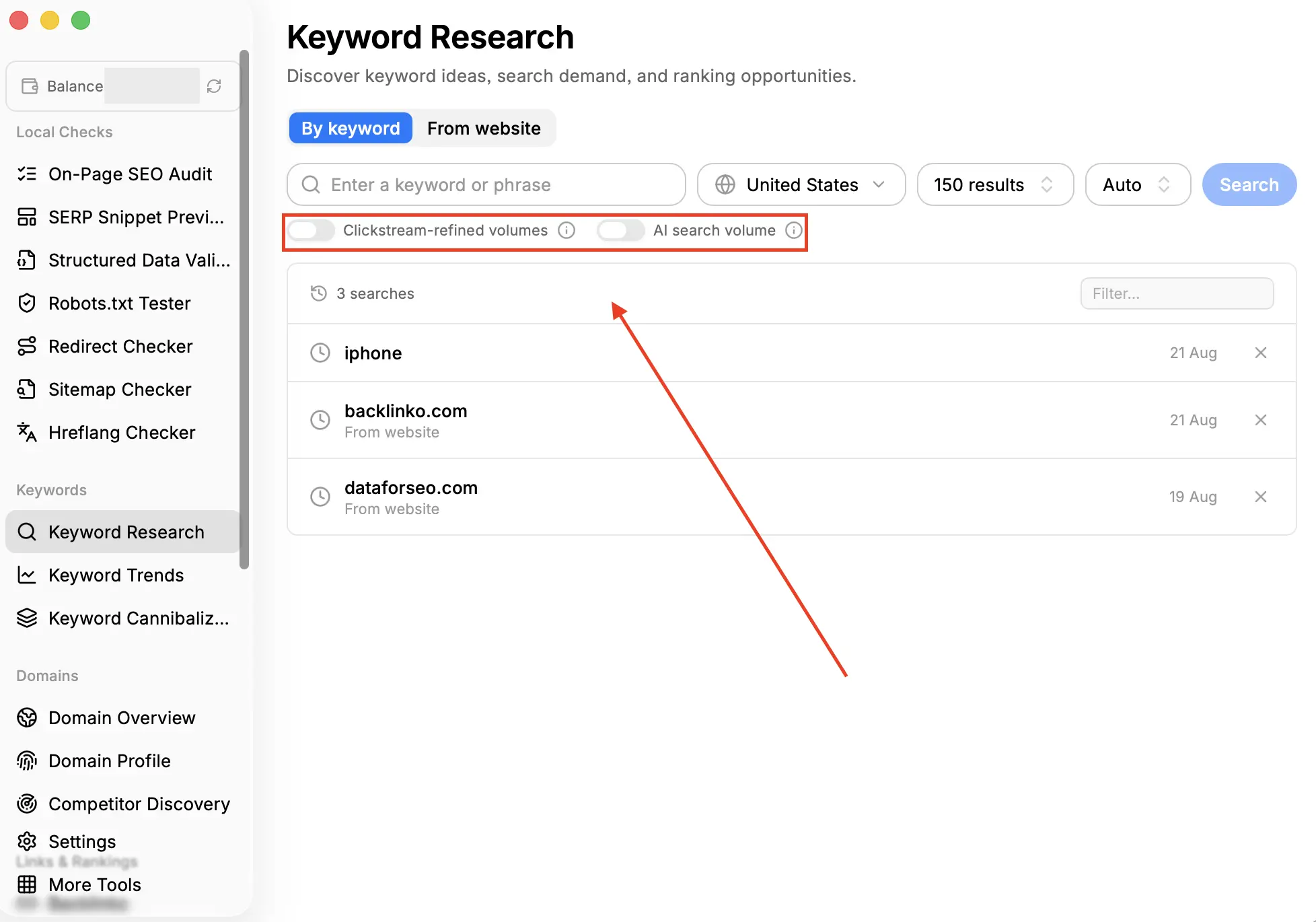
Here, on the Keyword Research tool’s tab, parameters “clickstream-refined volumes”, and “AI search volume”, are disabled by default. This is not an arbitrary precaution. For example, the “clickstream-refined volumes” toggle sets the include_clickstream_data parameter to true. This parameter in DataForSEO Labs endpoints multiplies the cost of a request by two when enabled.
4. Run locally whatever can run locally. Seven modules of the app never call the API, and anything that can be measured on the user’s device is measured there.
5. Display the account balance on every screen. The balance is shown in the top-left corner of the sidebar with a manual refresh option, so the price of an action is visible at the moment the user decides whether to perform it.
All of these decisions make the app cost-effective and prevent unnecessary spending, making the tool even more beneficial for a user. What’s more, such logic can be replicated in other local-based tools that leverage external APIs to fetch data.
Advice for developers building API-based tools
Finally, here are the recommendations from Dmytro for developers, condensed from the whole development process:
1. Decide on the architecture yourself and let AI fill it in. The app’s core structure is the part you will maintain for years, while the generated code can always be replaced.
2. Write the implementation plan before prompting. This rule applies to both an app builder and any coding agent, as the plan you prepare sets the ceiling on the quality of the output.
3. Point the model at the API documentation. If you skip this step, you will spend your time correcting confidently written but incorrect endpoint and parameter names.
4. Split the feature set according to which parts require paid data. This question should be asked separately for each feature rather than once for the entire product.
5. Cache by default and refresh on request. The same query should never be billed twice, and updating the data should remain an explicit user action.
6. Make the expensive data optional. Set the costly parameters to off by default and let the user decide whether the additional data is needed.
7. Show the running cost in the interface. A visible balance influences how users behave and allows them to always understand their budget.
8. Plan the time for manual verification. If AI writes most of your application, the verification stage cannot be compressed, so it should be included in the estimate from the very beginning.
9. Build the tool for yourself first. Local storage, cost control, and plain export: every constraint that shaped SEOInspector came from having exactly one user in mind, and this is what keeps the app coherent.
Wrap up
SEOInspector was built solely by Dmytro in his personal time, with the help of an AI app builder and access to the DataForSEO API. What holds the result together are the architectural decisions behind it and the meticulous approach to their implementation. All of them were made by Dmytro before the agent was asked to generate anything, so the AI only followed the implementation plan and the developer’s direction.
For reference, here is the table showing the app’s architecture and stack.
| Layer | Choice |
| Shell | Electron, with Chromium underneath, which is what makes browser APIs available inside the app |
| Language | TypeScript, across every script in the project |
| Runtime | Node.js under the Electron shell |
| UI | React and Tailwind, from the Glaze component set |
| Storage | IndexedDB, Chromium’s built-in client-side database |
| IDE | PhpStorm, for hands-on editing, module work, and builds |
What made the paid features of SEOInspector workable can be applied to any similar project. Calling the DataForSEO API directly removes the need for complex backend infrastructure, while pay-as-you-go pricing lets users choose which features and data to pay for. The same conditions apply whether you are building a utility tool like SEOInspector or a commercial product with a far wider feature set.
The data side is the part we take on. DataForSEO APIs cover the data needs for every live data module in the tool. The full endpoint reference, including request and response examples, is available in our documentation. With the Sandbox environment, you can configure and test the integration completely for free.
Try DataForSEO for free and build your own SEO tool with the best data.