
Most cold outreach opens with some version of “just checking in.” It gets ignored because it proves nothing. The sender clearly hasn’t looked into the account. What works instead is context: knowing what’s being said about a prospect’s brand before you write the first line to them. The catch is that researching each lead by hand falls apart after the first handful of the day. This post covers how to turn that research into one API call, so every lead on your list shows up with real brand-mention and sentiment context already attached.
What data Content Analysis API surfaces about a lead
Instead of researching every account manually, you can use the Content Analysis API to collect the signals that make outreach feel informed. It finds mentions of a keyword or brand across the web and scores the sentiment around them. A single Search request can return up to 1,000 citations, pulled from page types like news, blogs, message-boards, ecommerce, and organization pages. Each citation gets scored for positive, negative, or neutral polarity, plus finer emotions (anger, happiness, love, sadness, share, and fun) across 70+ languages. Every endpoint runs in the Live mode, so the data comes back in response to a single request rather than requiring a task-polling loop.
That combination is what makes it useful for lead enrichment. You learn where a brand shows up, how often, and how people feel about it, which can help you turn a name on a list into a lead you can say something specific about. It’s the difference between a template and a message that gets a reply.
Use case 1: Enrich a lead before the first email
The workflow is short. Take the prospect’s brand name, send it to the Search endpoint, and read back three things: how many recent mentions there are, how the sentiment splits, and which sources are doing the talking. Your opening line more or less writes itself from there. You might point to a recurring review theme, a spike in mentions after a launch, or a complaint your product happens to fix. The research that used to eat an hour is now one call.
To keep it completely hands-off, here’s a Make scenario that runs the enrichment for you. It uses our Content Analysis API to search for mentions for each brand name you give it, and writes the summary back to a Google Doc, so the context flows in on its own.
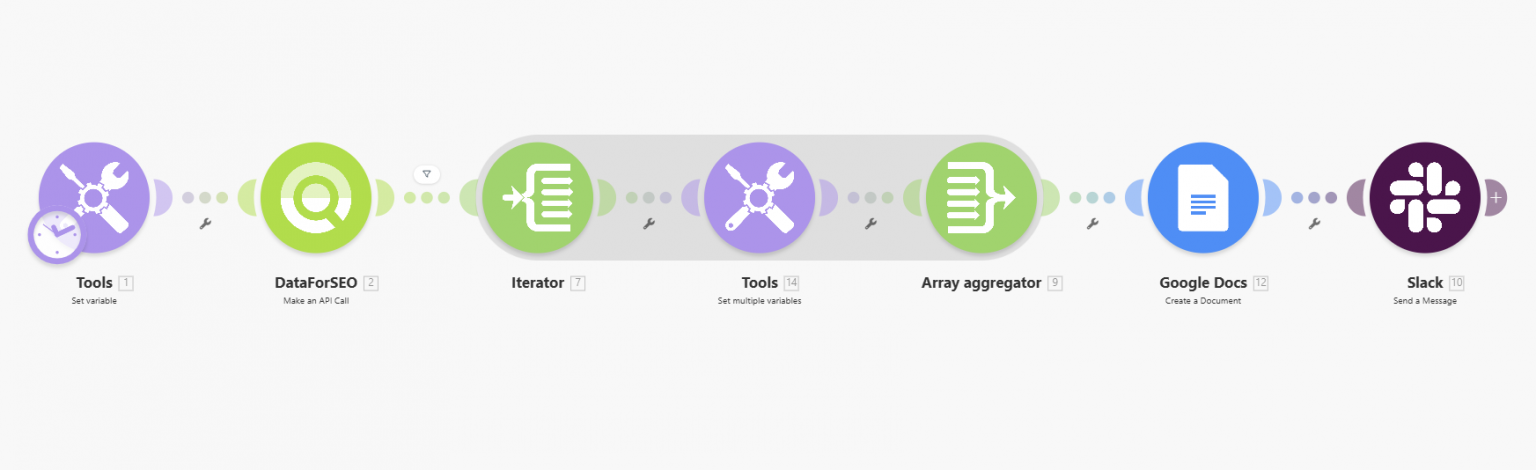
To get started, you need just a few things:
- DataForSEO account and API credentials (your API login and password).
- A Google account for storing mention records in Google Docs.
- Connected DataForSEO, Slack, and Google Docs integrations in Make.
Here’s what Content Analysis Search API request and response look like in JSON.
# Instead of 'login' and 'password' use your credentials from https://app.dataforseo.com/api-access
login="login"
password="password"
cred="$(printf ${login}:${password} | base64)"
curl --location --request POST "https://api.dataforseo.com/v3/content_analysis/search/live"
--header "Authorization: Basic ${cred}"
--header "Content-Type: application/json"
--data-raw '[
    {
        "keyword_fields": {
            "snippet": "logitech"
        },
        "keyword": "logitech",
        "page_type": [
            "ecommerce",
            "news",
            "blogs",
            "message-boards",
            "organization"
        ],
        "search_mode": "as_is",
        "filters": [
            "main_domain",
            "=",
            "reviewfinder.ca"
        ],
        "order_by": [
            "content_info.sentiment_connotations.anger,desc"
        ],
        "limit": 10
    }
]'
{
  "version": "0.1.20250815",
  "status_code": 20000,
  "status_message": "Ok.",
  "time": "0.4712 sec.",
  "cost": 0.0025,
  "tasks_count": 1,
  "tasks_error": 0,
  "tasks": [
    {
      "id": "08151234-1234-0123-0000-abcdef123456",
      "status_code": 20000,
      "status_message": "Ok.",
      "time": "0.4301 sec.",
      "cost": 0.0025,
      "result_count": 1,
      "path": [...],
      "data": {...},
      "result": [
        {
          "offset_token": "eyJWZXJzaW9uIjoxLCJTZWFyY2hBZnRlclZhbHVlcyI6eyJjb250ZW50cy5zZW50aW1lbnRfY29ubm90YXRpb25zLmFuZ3J5IjowLjA5NzU2Nzc1LCJfc2NvcmUiOjIxNTUuNDk0MSwidXJsX2hhc2giOiIzNDM1OTM5MjM3NTMzMTExNDQ1In0sIlRva2VuUmVhbE9mZnNldCI6MH0=",
          "total_count": 296,
          "items_count": 10,
          "items": [
            {
              "type": "content_analysis_search",
              "url": "https://reviewfinder.ca/top-computer-speakers/edifier-r1280db-vs-logitech-g560/",
              "domain": "reviewfinder.ca",
              "main_domain": "reviewfinder.ca",
              "url_rank": 126,
              "spam_score": 0,
              "domain_rank": 493,
              "fetch_time": "2022-08-12 18:40:33 +00:00",
              "country": "CA",
              "language": "en",
              "score": 5900.941,
              "page_category": [
                10019,
                10167,
                10873,
                12138,
                10002,
                10028,
                10222,
                13813
              ],
              "page_types": [
                "ecommerce"
              ],
              "ratings": null,
              "social_metrics": [
                {
                  "type": "facebook",
                  "like_count": 13
                }
              ],
              "content_info": {
                "content_type": "page_content",
                "title": "Verdict",
                "main_title": "Comparing Edifier R1280DB and Logitech G560",
                "previous_title": "Endorsement summary:",
                "level": 2,
                "author": null,
                "snippet": "After counting and adding up the 77 expert endorsements of the May rankings, Logitech G560 outranks Edifier R1280DB. This is not to say that Edifier R1280DB is a bad option. Like Logitech G560, it is recommended by experts, but less.nAs can be seen below, Logitech G560 outranks Edifier R1280DB by 13 positions. This indicates that, as of 4 Aug 2022, Logitech G560 is more critically acclaimed than Edifier R1280DB.",
                "snippet_length": 415,
                "social_metrics": [
                  {
                    "type": "facebook",
                    "like_count": 13
                  }
                ],
                "highlighted_text": null,
                "language": "en",
                "sentiment_connotations": {
                  "anger": null,
                  "happiness": 0.07077454775571823,
                  "love": 0.0959794893860817,
                  "sadness": 0.030060304328799248,
                  "share": null,
                  "fun": 0.15295149385929108
                },
                "connotation_types": {
                  "positive": 0.12338598817586899,
                  "negative": 0.41213861107826233,
                  "neutral": 0.4645053744316101
                },
                "text_category": [
                  10019,
                  10167,
                  10873,
                  12138,
                  10013
                ],
                "date_published": null,
                "content_quality_score": 90,
                "semantic_location": 90,
                "rating": null,
                "group_date": "2025-09-08 20:23:59 +00:00"
              }
            },
            {...},
            {...}
          ]
        }
      ]
    }
  ]
}
The fields you’ll read per mention live in connotation_types, sentiment_connotations, and rating. The total_count up top tells you how loud the brand is overall. Feed those into your outreach template and the first line stops being generic.
Use case 2: Score and prioritize your lead list
Enrichment isn’t only about the message. It also decides the order you work in. Before you touch the first lead, run the Summary or Sentiment Analysis endpoint across your whole target list and sort it by what comes back. A brand with rising negative sentiment is a warm opening if you sell anything close to improving reputation, support, or reviews. A brand with a sudden mention spike is probably mid-launch and watching its market.
Timing is the last piece, and Phrase Trends handles that. It returns mention stats by date, so you can reach out while a topic is still live instead of three weeks after it cooled off. The upshot: you’re not working an alphabetical list anymore. You’re working one sorted by signals, and those signals came from data you pulled in a single API call instead of an afternoon of manual digging.
Endpoints that power this workflow
The workflow above touches a few endpoints of our Content Analysis API. Here’s what each one does for lead enrichment:
| Endpoint | What it returns | Use it for |
| Search | Raw citations and per-mention sentiment for a brand. | Your enrichment call. |
| Summary | A one-shot overview of a brand’s citation and sentiment totals. | Scoring a list quickly. |
| Sentiment Analysis | The sentiment polarity and emotion breakdown on its own. | When you only need the tone. |
| Phrase Trends | Mention stats for a brand by date. | Timing the reach-out. |
| Rating Distribution | Mention stats by content rating. | Review-heavy targets. |
Enrichment stops being a project
Lead enrichment used to involve an analyst, a spreadsheet, and hours of manual research. With our Content Analysis API it comes down to a single step. One call tells you where a brand is discussed, how people feel about it, and which way that tone is moving, which is enough to open every message with something true and specific. Wire it into a Make scenario once and the research is done before the first line is written.